Introduction
Law firms live and die by reliable client communication — yet many still operate on landline systems or informal cell phone arrangements that create real gaps in service. An attorney in court can't answer a desk phone. A paralegal working remotely can't transfer a call from her personal cell to the main line. And a front desk running a single line has a single point of failure.
The consequences are measurable. According to Clio's 2024 secret-shopper research, 48% of law firms were unreachable by phone even after messages were left, and only 40% answered calls. Separately, Martindale-Avvo reports that 80% of potential clients move on to another attorney if they don't hear back within 48 hours.
This guide covers:
- What's broken with traditional law office phone systems
- How cloud VoIP fixes those gaps
- Which features matter most for legal practices
- Security requirements you can't skip
- How a transition actually unfolds
Key Takeaways
- 48% of firms are unreachable by phone — cloud VoIP eliminates the single-location, single-device problem entirely
- Call routing, voicemail transcription, call recording, and mobile access are table stakes for effective legal intake
- Attorney-client confidentiality requirements make encryption and access controls essential — not optional
- Number porting preserves existing phone numbers during transition, with zero call downtime
- A local technology partner — one who knows your market and can respond on-site — handles setup, training, and ongoing support in ways a remote national vendor simply won't
Why Traditional Law Office Phone Systems Fall Short
Desk-bound landlines were designed for an era when attorneys worked exclusively in-office, nine to five, five days a week. That era is gone. Today's firm has attorneys in court, paralegals working hybrid schedules, and clients who expect to reach someone immediately.
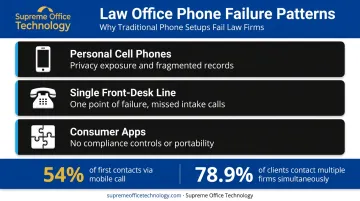
Three failure patterns show up repeatedly in law firms that haven't modernized:
- Personal cell phones for client calls — creates privacy exposure, fragments call logs, and makes it impossible to maintain a centralized record of client communications
- Single front-desk line — one receptionist, one line, and no backup means every court appearance or lunch break is a potential missed intake call
- Consumer apps patched together — tools like Google Voice lack number portability protections, compliance controls, and the administrative oversight a firm needs
Each of these gaps has a measurable cost. FindLaw's 2024 research found that 54% of legal consumers make first contact via mobile phone call. When that call hits voicemail with no follow-up, it hits a competitor next — Martindale-Avvo's data shows only 11% of consumers hire the first attorney they contact, while 78.9% reach out to multiple firms simultaneously.
Every unanswered intake call is a prospect already comparing your firm to the next one on the list.
What Is VoIP and How Does It Work for Law Firms?
VoIP (Voice over Internet Protocol) routes calls over an internet connection rather than copper telephone lines. To a caller, nothing changes — they dial the same number and reach the same firm. Behind the scenes, the call can ring simultaneously on a desk phone, a laptop app, and a smartphone app, with the firm's main business number appearing on every outbound call regardless of which device the attorney uses.
Comparing Your Three Options
Law firms typically encounter three phone system architectures:
| System Type | Upfront Cost | Flexibility | IT Overhead |
|---|---|---|---|
| Traditional PSTN Landline | Low hardware, high long-term | Location-locked | Minimal but rigid |
| On-Premises PBX | High (servers + hardware) | Moderate | Heavy — requires IT staff |
| Cloud-Hosted VoIP | Low to none | Full — any device, any location | Minimal — web portal management |
The cloud VoIP model has become the clear choice for small and mid-sized firms. TechRepublic's 2024 analysis puts cloud PBX costs around $30 per user per month, compared to roughly $50 per user per month for traditional landlines — an estimated savings of $240 per user annually before factoring in maintenance costs.
The operational advantages go further than cost. Routing changes, new users, and updated greetings happen through a web dashboard in minutes — no service call, no technician, no downtime.
That's the model Supreme Office Technology deploys for Connecticut law firms through its Hosted PBX service: cloud-based telephony with HD voice, click-to-dial, built-in redundancy, and an optional Session Border Controller (SBC) for added call security — all managed through a single web portal.
Essential VoIP Features for Law Offices
Not every VoIP plan is built for legal work. A basic business phone plan handles calls. A properly configured legal phone system handles intake, documentation, compliance, and mobility simultaneously.
Intake and Call Routing Capabilities
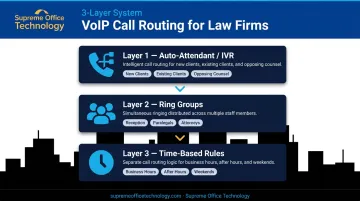
Call routing is where most firms win or lose potential clients. A well-configured system handles three routing layers:
- Auto-attendant/IVR menus — direct new client inquiries, existing client calls, and opposing counsel to the right destination without requiring a receptionist to field every call
- Ring groups — route incoming calls to ring simultaneously across multiple staff members so no single person becomes the bottleneck
- Time-based rules — different routing for business hours, after hours, and weekends; after-hours calls can route to a voicemail, an answering service, or an on-call attorney's mobile app
Call recording serves two purposes in a legal context: it creates automatic documentation of every client interaction, and it gives attorneys the ability to review calls between appearances rather than returning to the office to check a physical voicemail box.
Voicemail transcription takes that a step further — attorneys can read message content in seconds from any device, prioritize callbacks, and maintain written records of what was communicated. Note that Connecticut requires all-party consent for recorded calls, per Connecticut General Assembly guidance — any recording setup must include appropriate notification.
Mobility, Integration, and Administration
Attorneys in court, at depositions, or working remotely still need to answer, transfer, and return calls using the firm's main number — not a personal cell. Supreme Office Technology's UC-One platform makes this straightforward: one app covering voice, messaging, and conferencing across any device.
Beyond mobility, the right VoIP system connects directly with your existing workflows:
- Practice management integration — platforms like Clio enable automatic call logging against client matters, click-to-dial from contact records, and synced data that eliminates manual entry. Confirm native or API-based integration before committing to a provider.
- Web-based administration — non-technical staff can update greetings, add users, or change routing rules through a dashboard without calling for outside help. This matters when the office manager, not the IT department, owns day-to-day phone configuration.
Security, Ethics, and Client Confidentiality
This is where law firms face requirements that most businesses don't. ABA Model Rule 1.6(c) requires lawyers to make reasonable efforts to prevent unauthorized disclosure of client information. ABA Formal Opinion 477R (2017) extended this explicitly to electronic communications, requiring lawyers to understand and apply appropriate security safeguards — and ABA Formal Opinion 498 reinforced those obligations for attorneys in virtual practice environments.
At the state level, the Connecticut Bar Association's Informal Opinion 2013-07 confirms that Connecticut lawyers may use cloud-based services, including cloud communications platforms, provided they conduct appropriate vendor due diligence.
What to Require from Any VoIP Provider
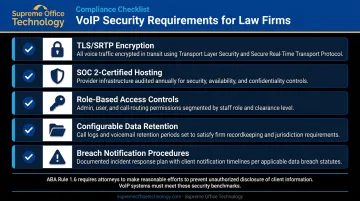
Before signing with a provider, verify these security features in writing:
- TLS/SRTP protocols for encrypted call signaling and media transport (note: calls that transit the public telephone network may not be end-to-end encrypted — ask providers specifically about this)
- SOC 2-certified data center hosting — review the actual report, not just the marketing claim
- Role-based access controls so only authorized personnel can access call recordings and logs
- Configurable data retention policies aligned with your records management obligations
- Breach notification procedures documented in the service agreement
Vetting a Provider's Security Posture
Marketing claims and actual security certifications are different things — request documentation before committing, and ask specifically:
- How and where are call recordings stored?
- Who at the provider organization can access our recordings or logs?
- Is client data sold or shared with third parties?
- What is the process if a breach occurs?
Cloud-hosted VoIP, when properly vetted, can match or exceed the security posture of an on-premises system. Reputable providers maintain enterprise-grade infrastructure and redundancy that a single-office law firm can't realistically replicate on its own. The key word is vetted.
For firms that need that confidence built in from the start, Supreme Office Technology's Hosted PBX with Session Border Controller provides a dedicated security layer that monitors voice traffic and blocks unauthorized access attempts — without requiring firms to manage it themselves.
Choosing the Right VoIP Provider for Your Firm
Evaluation Criteria That Matter
When comparing providers, focus on:
- Uptime SLA — target 99.9% or better (99.9% equals roughly 8.76 hours of potential downtime per year; 99.99% drops that to about 52 minutes)
- Transparent pricing — the headline per-user rate often excludes call recording storage, number porting fees, additional extensions, E911 charges, and SMS
- Contract flexibility — month-to-month vs. long-term lock-in affects your ability to scale or switch as the firm evolves
- Support model — responsive local support vs. an offshore ticket queue is a real difference when something goes wrong before a hearing
Total Cost of Ownership
PCMag's testing of business VoIP providers found pricing ranging from $10 to $65 per user per month depending on feature tier. Most small firms land around $20 per user per month for a capable mid-tier plan — but that number shifts when you add call recording, additional numbers, and SMS.
Build a 12- and 24-month cost model that includes every line item:
- All phone numbers and user licenses
- Desired features (call recording, voicemail transcription, SMS)
- Hardware costs if desk phones are preferred
- Any porting or setup fees
Compare that total against what you're currently spending on landlines and maintenance.
The Local Partner Advantage
National cloud-only vendors can provision a system remotely — but remote provisioning has limits. A local partner can walk your office, assess your existing infrastructure, configure the system around your firm's specific workflows, and provide hands-on support when something needs fixing before a hearing.
Supreme Office Technology has served Connecticut law firms — including Casner & Edwards LLP and Certilman, Balin, Adler & Hyman — for decades. That history means the team already understands how legal offices operate — intake workflows, after-hours routing, client confidentiality requirements. Their no-obligation office assessment gives you a direct evaluation of your current setup, identifies the real pain points, and maps out what a transition would actually involve.
How to Transition Your Law Firm to VoIP
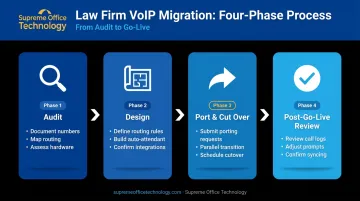
Most firms expect a VoIP transition to be more disruptive than it actually is. Here's how a well-managed migration unfolds:
Phase 1: Audit
- Document every published phone number (website, bar directory, marketing materials)
- Map existing call routing rules and identify where calls currently fall through
- Note any hardware in use and whether it's worth retaining
Phase 2: Design
- Define how new client calls, existing client calls, and after-hours calls should each route
- Build auto-attendant prompts and ring group assignments before go-live
- Confirm integration requirements with practice management software
Phase 3: Port and Cut Over
- Submit number porting requests — the FCC requires carriers to complete simple port requests within one business day once a complete request is received
- Number porting runs in parallel with the existing system, so the firm never loses calls during the transition
- Schedule the cutover on a low-volume day (Friday afternoon or Monday morning are common choices)
Phase 4: Post-Go-Live Review
- Review missed call reports and call logs in the first 30 days to catch routing gaps
- Adjust auto-attendant prompts based on actual caller behavior
- Confirm all integrations are syncing correctly — that's when setup is truly complete
Once the system is stable, staff training is straightforward — typically one focused session covers daily use for the entire team. The web-based admin portal handles most ongoing changes without any technical support needed.
Frequently Asked Questions
What is the best phone system for a small law firm?
Cloud-hosted VoIP is the right choice for most small and mid-sized firms. It combines professional features — call routing, recording, mobile access — with simple web-based administration, predictable per-user pricing, and no upfront hardware investment.
What is VoIP and how does it differ from a traditional law office phone system?
VoIP routes calls over an internet connection rather than copper telephone lines. Attorneys can make and receive calls on any device from any location, while a traditional landline ties both the call and the caller to a physical desk and a specific office location.
How much does a VoIP phone system cost for a law firm?
Cloud VoIP is typically priced per user per month, with capable mid-tier plans around $20 per user. Total costs depend on user count, features like call recording and additional numbers, and whether you need physical desk phones.
Can VoIP phone systems meet attorney-client confidentiality requirements?
Yes — when properly vetted. Systems with TLS/SRTP encryption, SOC 2-certified hosting, and role-based access controls satisfy attorney obligations under ABA Model Rule 1.6 and relevant state bar guidance. Request written documentation of these features before signing with any provider.
How long does it take to switch a law firm from a landline to VoIP?
Most firms complete the transition within a few days to a week. Number porting preserves existing phone numbers with no call downtime, and working with an experienced local technology partner — who can assess your infrastructure and configure the system properly from the start — cuts setup time and reduces the risk of disruption.