Introduction
Traditional landlines are on their way out. FCC data shows just 21 million switched access lines remain active as of late 2023, compared to 64 million interconnected VoIP subscriptions — and major carriers like AT&T are actively retiring copper infrastructure in favor of fiber. For Connecticut businesses still running on-premise PBX or POTS lines, the question isn't whether to switch, but when and to what.
That "to what" question has a lot riding on it. Today's cloud phone systems go far beyond voice — the best platforms combine AI-generated call summaries, CRM integrations, team messaging, and video conferencing, all for $10–$40 per user per month.
This guide breaks down the top 10 cloud phone systems for 2026 so Connecticut businesses can find the right fit — without overpaying for features they won't use or under-buying for the scale they need.
TL;DR
- A cloud phone system routes calls over the internet — no on-site PBX hardware needed
- Pricing ranges from $10 to $40+/user/month, with most SMBs landing in the $15–$35 range
- The top 10 for 2026: RingCentral, Zoom Phone, Nextiva, Vonage, GoTo Connect, Dialpad, Ooma, Grasshopper, 8x8, and Microsoft Teams Phone
- The right pick depends on team size, call volume, integrations, and budget — not brand recognition
- Connecticut businesses get better results working with a local technology partner who knows their workflows — not just the vendor's sales sheet
What Is a Cloud Phone System and Why Businesses Are Making the Switch
A cloud phone system — also called cloud PBX or hosted VoIP — is a business telephone platform that delivers calls and communications over the internet. The provider hosts all the infrastructure offsite. All you need is an internet connection and a compatible device — no wiring closets, no PBX hardware, no on-site IT staff dedicated to keeping phones operational.
That simplicity is part of what's accelerating adoption — but it's not the only factor.
What's Driving Adoption in 2026
Several converging forces are pushing businesses off legacy systems at once:
- Carrier copper retirement — AT&T and other incumbents are replacing copper with fiber, and the FCC now requires 90 days' notice before any planned copper retirement — meaning the timeline is accelerating
- Remote and hybrid work — Gallup reports 52% of remote-capable U.S. employees work hybrid, with another 26% fully remote; legacy desk-phone systems simply weren't built for that reality
- AI-powered features — call transcription, automated summaries, and AI receptionists are now standard on many SMB plans, not enterprise add-ons
- CRM and software integrations — modern workflows require phone systems that talk to Salesforce, HubSpot, or EHR platforms
Cloud vs. Traditional PBX at a glance:
| Factor | Cloud Phone System | On-Premise PBX |
|---|---|---|
| Setup cost | Low (subscription-based) | High (hardware + installation) |
| Scalability | Add users instantly | Requires hardware expansion |
| Maintenance | Provider-managed | Internal IT or vendor contract |
| Remote access | Any internet-connected device | Typically office-bound |
| AI features | Increasingly standard | Rare or unavailable |
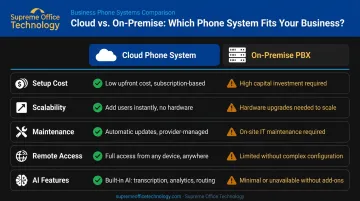
For Connecticut businesses working through this transition, Supreme Office Technology provides managed IT and unified communications services, covering everything from initial assessment through implementation.
Top 10 Cloud Phone Systems for 2026
These 10 platforms were selected based on features, pricing, reliability, ease of use, integration capabilities, and suitability across business sizes — from solo operators to multi-department organizations.
RingCentral
RingCentral is a market-leading UCaaS platform with a 99.999% uptime SLA and one of the most comprehensive feature sets available. Its drag-and-drop IVR editor supports up to 250 call menus, and its AI assistant covers phone, SMS, and team messaging.
| Category | Details |
|---|---|
| Starting Price | ~$20/user/month (Core plan, billed annually — verify current pricing at ringcentral.com) |
| Key Features | Unlimited domestic calling, multilevel IVR, AI call transcription and summaries, video meetings (up to 100 participants on Core), team chat, 500+ integrations |
| Best For | Teams needing full UCaaS; customer support departments with complex inbound routing |
Note: SMS allowances are capped at 25 messages/user/month on the Core plan. Advanced AI tools and video for up to 200 participants require higher tiers.
Zoom Phone
Zoom Phone is the telephony arm of the Zoom ecosystem — available standalone or bundled with Zoom Workplace. It's the natural choice for organizations already running Zoom Meetings who want to consolidate communications under one platform.
| Category | Details |
|---|---|
| Starting Price | ~$10/user/month (US & Canada Metered — verify current pricing at zoom.us/pricing/zoom-phone) |
| Key Features | AI Companion (call summaries, voicemail prioritization), on-demand call recording, call queues, multi-level IVR, SMS/MMS, team chat |
| Best For | Businesses already using Zoom for video; global remote teams needing flexible international calling |
Note: The Global Select plan supports flat-rate domestic calling in 40+ countries. Video conferencing and advanced analytics require plan upgrades.
Nextiva
Nextiva offers unlimited VoIP calling in the US and Canada, video meetings, team chat, and toll-free minutes across all plans — plus strong 24/7 customer support that sets it apart from most competitors at this price point.
| Category | Details |
|---|---|
| Starting Price | $15/user/month (Core plan, billed annually) |
| Key Features | Unlimited US/Canada calling, auto attendant, voicemail transcription, video meetings, team chat, AI-powered routing on higher plans |
| Best For | Teams seeking strong value across features and support; businesses that want voice, video, and chat without juggling multiple vendors |
Note: SMS is limited on the Core plan. The XBert AI Receptionist is available as a paid add-on.
Vonage
Vonage Business Communications is a highly customizable platform with 50+ standard features, unlimited domestic calling across the US, Canada, and Mexico, and a developer-friendly API for custom workflow integrations.
| Category | Details |
|---|---|
| Starting Price | $19.99/line/month (Mobile plan — verify current pricing at vonage.com/unified-communications/pricing) |
| Key Features | Unlimited calling in US/Canada, unlimited domestic SMS, IVR, video conferencing (up to 200 participants on Premium), 99.999% uptime |
| Best For | Teams with heavy SMS usage; businesses frequently calling Canada; startups needing a scalable entry-level system |
Note: Call queuing, auto call recording, and the AI virtual assistant are paid add-ons.
GoTo Connect
GoTo Connect is built for IT teams, support departments, and businesses with international calling needs. Its base plan includes 100+ features and unlimited calling to 50+ countries — genuinely unusual at this tier.
| Category | Details |
|---|---|
| Starting Price | Custom pricing — contact GoTo Connect sales for a quote |
| Key Features | Unlimited calling to 50+ countries, video meetings (up to 250 participants), multi-level IVR, real-time analytics, AI Receptionist with multilingual support |
| Best For | IT and support teams; businesses with international calling needs; distributed or education-sector organizations |
Note: Pricing is not publicly listed. SMS credits and toll-free minutes have usage caps across all plans.
Dialpad
Dialpad is an AI-native platform where real-time transcription, post-call summaries, and multi-level IVR come standard — not as add-ons. In October 2025, Dialpad launched its Agentic AI Platform, adding skills like scheduling, routing, and knowledge retrieval.
| Category | Details |
|---|---|
| Starting Price | ~$15/user/month (Standard plan — verify current pricing at dialpad.com/pricing) |
| Key Features | AI-powered real-time transcription, post-call summaries, multi-level IVR, SMS/MMS, custom call routing, virtual numbers in 70+ countries |
| Best For | Customer support teams prioritizing AI-driven call intelligence; small call centers seeking productivity tools without add-on costs |
Note: CRM integrations and additional ring groups require the Pro plan. Video meetings are capped at 10 participants on Standard.
Ooma Office
Ooma Office is designed for small, in-person businesses — medical offices, schools, manufacturing environments — where traditional office phone features matter as much as VoIP flexibility. It includes overhead paging and intercom support that most cloud platforms skip entirely.
| Category | Details |
|---|---|
| Starting Price | $19.95/user/month (Essentials plan, no contract required) |
| Key Features | Unlimited calling in US, Canada, Mexico, and Puerto Rico; ring groups; virtual receptionist; overhead paging; intercom; desk phone compatibility |
| Best For | Small in-person teams; businesses in healthcare, education, or manufacturing that need traditional office phone features alongside VoIP |

Note: Voicemail transcription, desktop app access, and CRM integrations are locked to higher-tier plans (Pro and Pro Plus).
Grasshopper
Grasshopper is built for solopreneurs and very small businesses that want a professional phone presence without per-seat pricing. It uses flat monthly account pricing — unlimited users on most plans — with a simple mobile and web app setup.
| Category | Details |
|---|---|
| Starting Price | $14/month (True Solo plan, billed annually — account-based, not per-user) |
| Key Features | Unlimited US calling and texting, voicemail transcription, simultaneous ring, automated text replies for missed calls, multiple extensions, AI receptionist and call summaries (added 2026) |
| Best For | Solopreneurs and very small businesses needing a professional number without per-seat pricing; teams sharing phone numbers |
Note: No video conferencing or team messaging. Integrations are extremely limited compared to full UCaaS platforms.
8x8
8x8 is built for mid-to-large businesses with international reach and contact center ambitions. It supports unlimited calling to up to 48 countries and video meetings for up to 500 participants, with advanced call monitoring and an AI Studio for building and deploying AI agents.
| Category | Details |
|---|---|
| Starting Price | Custom pricing — contact 8x8 sales for a quote |
| Key Features | Unlimited calling to 48 countries, video meetings (up to 500 participants), AI transcription, call monitoring (listen/whisper/barge), team chat, contact center add-ons |
| Best For | Mid-to-large businesses with international calling needs; teams planning to scale into a full contact center environment |
Note: 8x8 AI Studio is currently in Early Access. The platform carries a steeper learning curve than most SMB-focused options.
Microsoft Teams Phone
Microsoft Teams Phone extends the Microsoft 365 ecosystem into external calling. Internal and external calls happen directly inside Teams, with AI personal assistant features and collaborative calling within team channels.
| Category | Details |
|---|---|
| Starting Price | $10/user/month (Teams Phone Standard, billed annually — requires a separate Teams license) |
| Key Features | PSTN connectivity, internal/external calling within Teams, AI personal assistant, SMS and audio conferencing, shared numbers, desktop and mobile apps |
| Best For | Businesses standardized on Microsoft 365; large organizations wanting to consolidate calling within an existing Teams environment |
Note: External calling requires plan upgrades with calling minute caps on most tiers. AI Copilot features require a separate add-on subscription.
Key Features to Look for in a Cloud Phone System
Not all cloud phone systems are equal at the feature level. Businesses regularly overpay for features they don't use or discover missing essentials after signing a contract. Before committing, verify these specifically:
Core Features to Confirm
- Unlimited domestic calling — or understand exactly what the meter cap is
- SMS/MMS — check monthly allowances, not just whether it's "included"
- Multi-level IVR and auto attendant — essential for any team handling inbound calls
- Call recording and transcription — confirm whether these are standard or add-ons
- CRM and app integrations — critical if your team runs Salesforce, HubSpot, or a healthcare EHR
AI Features Worth Prioritizing in 2026
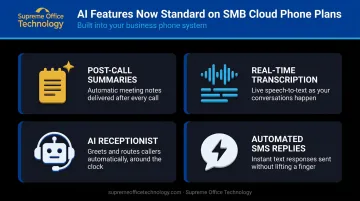
AI tools are no longer enterprise-only. These are now available on SMB plans across multiple platforms:
- Post-call summaries — automatically generated after each call, saving reps from manual note-taking
- Real-time transcription — especially useful for sales and support teams
- AI receptionists — handle after-hours calls and overflow without voicemail
- Automated SMS replies — respond to missed calls instantly with a text
Contract and Scalability Checklist
- Month-to-month flexibility vs. annual-only lock-in
- Transparent per-user pricing without hidden add-on costs
- Free trial availability before committing
- Responsive onboarding and support — especially important for businesses without in-house IT
That last point matters more than most buyers expect. For Connecticut businesses, working with a local technology partner — like Supreme Office Technology, which has supported CT businesses with unified communications and VoIP for over 40 years — means faster onboarding and a direct line to support when something goes wrong.
How to Choose the Right Cloud Phone System
Evaluation Criteria That Actually Matter
Systems were assessed across these dimensions:
- Pricing transparency and value (base plan vs. paywalled features)
- Feature depth on the entry-level plan
- Call quality and uptime reliability
- Mobile and desktop app usability
- Integration ecosystem
- AI capabilities without requiring expensive add-ons
- Fit across business sizes
A common mistake is choosing a provider based on brand name alone — without verifying that its feature set fits how your team works day to day.
Matching Platform to Use Case
| If your priority is... | Consider... |
|---|---|
| Full UCaaS (voice + video + chat) | RingCentral, Nextiva, 8x8 |
| AI-first call intelligence | Dialpad, RingCentral, Zoom Phone |
| International calling | GoTo Connect, 8x8 |
| Microsoft 365 integration | Microsoft Teams Phone |
| Small in-person office | Ooma Office |
| Solo or micro-business | Grasshopper |
| Zoom ecosystem consolidation | Zoom Phone |
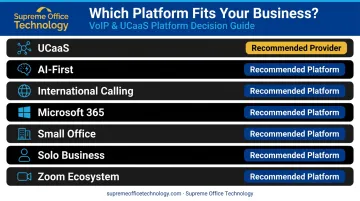
Use this table as a starting point, then pressure-test your shortlist against your team's real communication patterns before committing.
Conclusion
Cloud phone systems give Connecticut businesses a flexible way to replace aging landlines and on-premise PBX hardware — often at lower total cost with better flexibility. The right platform is the one that fits your team's daily workflows, integrates with the tools you already use, and scales without forcing a costly system swap two years from now.
Before committing to a platform, work through these four factors:
- Total cost of ownership — include add-ons, per-user fees, and contract terms
- User adoption requirements — training time, onboarding support, and interface complexity
- Scalability — how easily the system grows as your headcount or locations change
- Support availability — response times, escalation paths, and local vs. remote assistance
Supreme Office Technology has been helping Connecticut businesses upgrade their technology for over 40 years. If you're evaluating a move to a cloud phone system, their team offers a free, no-pressure assessment to help identify the right unified communications solution for your specific environment — whether you're a three-person office in New Haven or a multi-department operation in Waterbury.
Reach out at (203) 239-6511 or info@supremeofficetechnology.com to start the conversation.
Frequently Asked Questions
What is a cloud phone system?
A cloud phone system is a VoIP-based business telephone platform hosted by a third-party provider that routes calls and communications over the internet — no on-site PBX hardware required. Users can make and receive calls from any internet-connected device, including smartphones, laptops, and IP desk phones.
How much does a cloud phone system cost per month?
Cloud phone systems typically run $10–$40+ per user per month. Basic plans with calling and voicemail start around $10–$20/user, while tiers with AI features, analytics, and integrations reach $25–$40+. Annual billing usually lowers the cost.
What is the difference between a cloud phone system and a traditional PBX?
A traditional PBX requires on-site hardware, physical wiring, and dedicated IT maintenance. A cloud phone system is hosted offsite and accessed over the internet — faster to set up, easier to scale, generally lower in cost, and accessible from any device or location.
Do I need special hardware to use a cloud phone system?
No special hardware is required. Softphone apps on existing smartphones, tablets, or computers handle calls out of the box. Businesses that prefer physical handsets can add compatible IP desk phones or VoIP adapters — but both are optional.
Can I keep my existing business phone number when switching?
Yes. Most cloud phone providers support number porting. FCC rules require simple ports to be completed within one business day, though wireline transitions may take several days. Confirm porting support — including toll-free numbers — with your chosen provider before signing.
How reliable are cloud phone systems for business use?
Leading providers offer 99.999% uptime SLAs — roughly 5.26 minutes of downtime per year — backed by geographically distributed data centers. Reliability also depends on your internet connection; enable Quality of Service (QoS) settings to prioritize voice traffic and keep a backup connection available for critical operations.