Introduction
Picture this: your team has 20 minutes before a compliance audit, and no one can locate the signed version of last year's data retention policy. It's buried somewhere across three shared drives, two email threads, and a filing cabinet nobody's touched since 2021. Sound familiar?
Poor document management isn't just frustrating — it's costly. According to AIIM's 2024 research, 78% of organizations feel overwhelmed by the volume and complexity of their information, and only 29% automate most aspects of their information management strategy.
Enterprise Document Management (EDM) exists to fix exactly this. This guide covers everything you need to know: what EDM actually is, how it works, its core features, which industries need it most, and how to choose a system that fits your organization.
Key Takeaways
- EDM is a systematic framework for creating, organizing, storing, and retiring documents across their full lifecycle
- A Document Management System (DMS) is the software that executes EDM strategy
- Core features include version control, role-based access, workflow automation, and compliance tools
- Legal, healthcare, education, and manufacturing sectors gain the most from EDM adoption
- Start with a needs assessment before selecting any software platform
What Is Enterprise Document Management?
Enterprise Document Management is the systematic process of creating, capturing, organizing, storing, retrieving, and disposing of business documents within a large organization. The key word is systematic — EDM is a governed framework, not a folder structure.
EDM vs. DMS vs. ECM
These three terms get used interchangeably, but they mean different things:
| Term | What It Is |
|---|---|
| EDM | The organizational framework and strategy for managing documents |
| DMS | The software tool that executes the EDM strategy |
| ECM | The broader ecosystem — encompasses DMS plus records management, workflow automation, and compliance across all content types |
As AIIM defines it, ECM is a combination of strategies, methods, and tools to capture, manage, store, preserve, and deliver information through its lifecycle. A DMS handles the document layer within that broader ECM ecosystem.
Three Deployment Models
Organizations can deploy a DMS in three ways:
- On-premise — Hosted on internal servers; preferred by government agencies, hospitals, and others with strict data sovereignty requirements
- Cloud-based — Hosted by a third-party vendor; offers scalability, automatic updates, and remote access for distributed teams
- Hybrid — Combines on-premise control with cloud flexibility; works well for organizations managing both sensitive and general-purpose documents
Why Basic File Storage Isn't Enough
Shared drives and email folders save files — and that's where their usefulness ends. Enterprise document management adds:
- Version control with full edit history
- Automated approval and routing workflows
- Role-based access permissions
- Compliance tools and retention policies
- Searchable audit trails
For regulated industries — healthcare, legal, finance, government — these capabilities aren't optional features. They're baseline operational requirements.
Key Features of an Enterprise Document Management System
Centralized Document Repository
All documents live in one searchable location — no more version confusion across departmental drives. A central repository eliminates silos, reduces duplicates, and ensures everyone works from the same source of truth.
Version Control and Audit Trails
Every edit is tracked: who made it, when, and what changed. Teams always access the current version, and the full document history is available for compliance reviews or dispute resolution. Microsoft SharePoint, for example, stores the last 500 versions by default.
Access Control and Role-Based Permissions
Administrators assign granular permissions so only authorized users can view, edit, or approve specific documents. NIST describes this model as managing access rights based on organizational roles rather than individual user-by-user lists — far more scalable and secure as teams grow.
Workflow Automation
Documents don't sit in inboxes waiting for someone to remember to forward them. Automated routing sends files for review, approval, signature, or archiving based on predefined rules. For document-heavy teams, that means fewer delays, fewer dropped handoffs, and faster turnaround on time-sensitive approvals.
Compliance and Security Features
EDM systems include compliance and security controls that directly reduce legal and operational risk:
- Encryption protects documents at rest and in transit
- Audit logs satisfy requirements like HIPAA's technical safeguard mandates for electronic protected health information
- Retention policies enforce legal timelines automatically — HIPAA, for instance, requires documentation retention for six years from creation or last effective date
- E-signature support with time-stamped audit trails meets FDA 21 CFR Part 11 requirements for regulated industries
- GDPR compliance tools help organizations avoid fines that can reach €20 million or 4% of global annual turnover
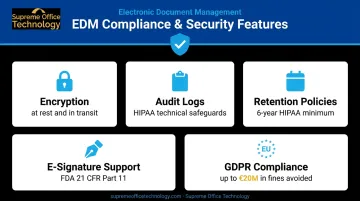
For regulated industries like healthcare, legal, and finance, these aren't optional features. They're what keeps organizations audit-ready and out of regulatory trouble.
Benefits of Enterprise Document Management
Increased Productivity
McKinsey found that workers spend nearly 20% of their workweek searching for internal information or tracking down colleagues. EDM cuts that time significantly through centralized storage and intelligent search. Teams in different locations can access, co-edit, and comment on the same document simultaneously — no email chains or version confusion required.
Enhanced Security and Audit Readiness
Productivity gains matter little if a compliance failure wipes them out. Regulated industries face real consequences for document failures. HHS OCR has collected over $144 million in HIPAA civil penalties through enforcement actions, with per-violation fines reaching $50,000. Role-based access, encryption, and automated audit trails keep organizations audit-ready year-round.
Cost Reduction
The cost savings from EDM come from multiple directions:
- Eliminated physical storage (paper, filing cabinets, off-site storage facilities)
- Reduced labor tied to manual document routing and approval chasing
- Fewer duplicate records requiring reconciliation
- Lower audit-preparation effort when documentation is already organized and accessible
Better Decision-Making
Decision-makers move faster and more accurately when current information is one search away rather than buried in inboxes or siloed systems. A centralized repository removes the guesswork of outdated reports and conflicting document versions across departments.
How the Enterprise Document Management Process Works
EDM follows a six-stage document lifecycle:
- Creation or Capture — Documents are created digitally or scanned from physical sources using MFPs or dedicated scanners
- Organization and Indexing — Files are tagged with metadata (who, what, when, where) and categorized for retrieval; as NARA notes, metadata makes records identifiable, interpretable, and governable
- Storage and Security — Documents are stored with encryption and access controls applied at the point of ingestion
- Collaboration and Distribution — Authorized users access, co-edit, annotate, and share documents within permission boundaries
- Version Control and Approval — Changes are tracked automatically; documents route through predefined review and sign-off workflows
- Retention, Archiving, and Disposal — Documents are held per legal and business policies, then securely archived or deleted when retention periods expire
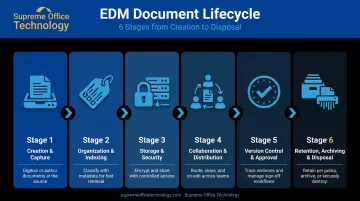
These stages don't require manual handoffs. Workflow automation moves documents through each phase based on predefined rules — a contract routes to legal review, then executive approval, then secure archiving — with no one forwarding emails or chasing signatures.
Metadata and indexing are what make large document libraries actually searchable. Without proper tagging at ingestion, even a well-configured DMS becomes a storage system nobody can navigate reliably.
Which Industries Benefit Most from Enterprise Document Management
Legal
Law firms manage contracts, case files, client records, and regulatory filings across years-long matters. EDM provides full audit trails for every document interaction, version histories that hold up in court, and access controls that protect client confidentiality. The 2024 ABA Tech Report found that 74.7% of legal professionals now use cloud computing for work tasks — document management is central to that shift.
Healthcare
HIPAA requires covered entities to provide patients access to their medical records within 30 calendar days. Without a functioning EDM system, meeting that deadline consistently while managing thousands of patient records is nearly impossible.
EDM also enforces the technical safeguards HIPAA mandates, including:
- Access controls to restrict who views protected health information
- Audit controls to log every document interaction
- Integrity controls to prevent unauthorized alteration
- Transmission security for electronic records in transit
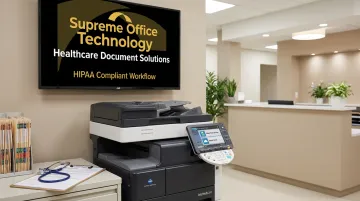
Supreme Office Technology works with Connecticut medical facilities to deploy HIPAA-compliant document solutions — including Konica Minolta scanners with healthcare certification and Dispatcher Phoenix Rx Shield, a healthcare-specific print management tool designed to secure document workflows at the point of scanning or printing.
Education and Manufacturing
Educational institutions face FERPA obligations requiring access to student records within 45 days and maintenance of disclosure logs for as long as records are kept. Compliance requirements differ sharply in manufacturing, where ISO 9001:2015 governs availability, retrieval, retention, and disposition of quality records across production, design, and QA — but the underlying need is the same: controlled, auditable document workflows.
Supreme Office Technology has over 40 years of experience helping Connecticut businesses across these sectors implement document management solutions sized for their specific compliance environments and operational scale.
How to Choose the Right Enterprise Document Management System
Evaluate Against Your Actual Requirements
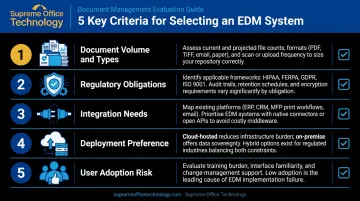
Before comparing vendors, map your organization's situation:
- Document volume and types — high-volume scanning needs differ from contract management needs
- Regulatory obligations — HIPAA, FERPA, GDPR, ISO 9001 each impose specific requirements
- Integration needs — does the system connect with your existing ERP, CRM, or email platform?
- Deployment preference — cloud, on-premise, or hybrid based on security and IT infrastructure
- User adoption risk — AIIM identifies user adoption as the top reason ECM deployments fail; ease of use matters
Think Beyond License Cost
Total cost of ownership includes implementation, data migration, workflow configuration, staff training, ongoing maintenance, and scaling costs as your organization grows. A cheaper platform with complex implementation often costs more over three years than a more expensive system with faster user adoption.
Start With a Needs Assessment
Selecting software before understanding your document pain points is how organizations end up with expensive systems their teams don't use. Map your current bottlenecks, compliance obligations, and workflow gaps first.
That's where a structured assessment helps. Supreme Office Technology provides no-obligation office assessments for Connecticut businesses: a free on-site evaluation, typically under an hour, that examines your current document environment, surfaces inefficiencies, and identifies solutions that fit your specific workflows.
With over 40 years serving organizations across New Haven, Waterbury, Middletown, and surrounding areas, their team understands the compliance pressures and operational challenges that Connecticut businesses in healthcare, legal, education, and manufacturing actually face.
Frequently Asked Questions
What is the difference between DMS and ECM?
A DMS (Document Management System) focuses specifically on storing, organizing, and retrieving digital documents. ECM (Enterprise Content Management) goes further — it encompasses records management, workflow automation, compliance tools, and other content-related processes across the entire organization.
What are examples of ECM software?
Common ECM and DMS platforms include Microsoft SharePoint, OpenText Documentum, DocuWare, Laserfiche, and M-Files. The right choice depends on your organization's size, industry, and compliance requirements — there's no universal best option.
What is EDM in HR?
In HR, EDM refers to the digital management of employee records, onboarding documents, performance reviews, compliance forms, and policy documents. It enables HR teams to securely store and retrieve personnel information while meeting data privacy regulations like GDPR.
How is enterprise document management different from basic file storage?
Basic file storage saves files in a location. EDM adds version control, workflow automation, role-based access, audit trails, compliance tools, and intelligent search — turning documents into governed, searchable business assets rather than passive files sitting in a folder.
Is enterprise document management suitable for small and mid-sized businesses?
EDM is not exclusive to large corporations. Small and mid-sized businesses in regulated industries like healthcare, legal, and finance especially benefit. Many cloud-based DMS platforms are designed to scale affordably for organizations at any stage of growth.
What is the document management lifecycle?
The lifecycle covers six stages: creation or capture, organization and indexing, secure storage, collaboration and distribution, version control and approval, and retention, archiving, or secure disposal based on legal and business requirements.