Introduction
Traditional phone systems were built for a different era — one where every employee sat at the same desk, in the same building, every single day. For Connecticut businesses now managing remote teams, multiple locations, or growing call volumes, that infrastructure has become a liability: costly to maintain, hard to scale, and increasingly unsupported as legacy networks wind down.
FCC data shows U.S. business and government switched access lines fell from 10.4 million in June 2024 to 8.6 million by June 2025 — while interconnected VoIP subscriptions climbed to nearly 44 million over the same period. For businesses still holding onto legacy lines, the window to migrate on their own terms is narrowing.
Hosted VoIP is the technology driving that shift: a cloud-based phone service where a third-party provider manages all the infrastructure, and your business makes calls over the internet instead of copper wire.
This guide covers what hosted VoIP is, how it works, what benefits it delivers, how it compares to alternatives, and how to decide whether it's the right fit for your business.
Key Takeaways
- Hosted VoIP routes calls over the internet — no on-site phone hardware required
- Providers handle all maintenance, updates, and system upkeep — your team manages nothing on the back end
- Pricing typically runs $15–$40 per user per month for entry and mid-tier plans
- Plan 100 Kbps of upload and download bandwidth per simultaneous call
- Remote teams, multi-location offices, and fast-growing businesses get the most out of hosted VoIP
What Is Hosted VoIP?
Hosted VoIP is a cloud-based phone service where a third-party provider hosts and manages all the telephony infrastructure — servers, software, and routing hardware — in their own data centers. Your business needs no on-premises phone equipment to make or receive calls.
VoIP vs. Hosted VoIP: The Key Distinction
These two terms are related but not identical:
- VoIP (Voice over Internet Protocol) is the underlying technology — it converts voice into digital data packets and transmits them over IP networks
- Hosted VoIP is the delivery model — it means all the infrastructure running that VoIP system lives off-site with a provider, not in your office
VoIP is the engine. Hosted VoIP means someone else maintains that engine at their facility — you just drive.
How It Compares to Traditional Landlines
| Traditional Landline (PSTN) | Hosted VoIP | |
|---|---|---|
| Call routing | Copper wire network | Internet connection |
| Infrastructure | On-site hardware required | Provider's data centers |
| Scalability | Hardware changes needed | Admin portal adjustments |
| Remote access | Limited or none | Any device, anywhere |
A Note on Terminology
Hosted VoIP, cloud VoIP, cloud PBX, and hosted PBX are often used interchangeably. In practice, most businesses can treat them as the same thing. Here's how they technically differ:
- Hosted VoIP — specifically describes the provider-managed infrastructure model
- Cloud VoIP — a broader umbrella term covering any internet-based voice service
- Hosted/Cloud PBX — emphasizes the private branch exchange (call routing) component hosted off-site
All three eliminate on-site phone hardware.
How Does Hosted VoIP Work?
The call process is straightforward, even if the underlying technology isn't:
- You speak into a device — desk phone, computer, or mobile app
- Your voice converts into digital data packets
- Packets travel over your internet connection to the provider's servers
- The provider routes the call to its destination — another VoIP user, a mobile phone, or a traditional landline
- Data converts back into audio the recipient hears
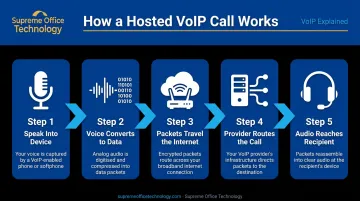
The whole process happens in milliseconds. That speed is only possible because of the infrastructure your provider runs in the background.
What the Provider Actually Does
Your hosted VoIP provider manages all the backend systems that make reliable calling possible. That includes:
- Server hosting and infrastructure management
- Call routing and system configuration
- Security patches and software updates
- Uptime monitoring and redundancy
You don't need internal technical staff managing phone hardware. That burden shifts entirely to the provider.
Devices and Setup
One of hosted VoIP's biggest practical advantages is device flexibility. Employees can make and receive calls from:
- IP desk phones — professional hardware for office workstations
- Softphone apps — desktop software that turns a computer into a phone
- Mobile apps — business number accessible from any smartphone
No dedicated phone lines or on-site PBX hardware required. Many existing SIP-compatible desk phones can also be reused if they're unlocked and provisionable with the new provider, so check compatibility before buying new hardware.
Internet Requirements
Call quality depends on a stable, reliable internet connection. The planning benchmark is 100 Kbps of upload and download bandwidth per simultaneous call — consistent with guidance from Nextiva and RingCentral, which recommends 90 Kbps dedicated per voice line.
Raw speed matters less than connection stability. Watch these three metrics:
- Latency: Keep one-way delay under 150 ms (per ITU-T G.114 standards)
- Jitter: Should stay below 30–50 ms to avoid choppy audio
- Packet loss: Business-grade VoIP requires under 1%, ideally zero
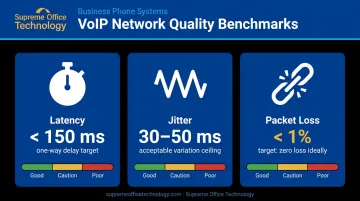
A fast but inconsistent connection will cause more problems than a slower but stable one.
Key Benefits of Hosted VoIP for Businesses
Cost Savings
Hosted VoIP eliminates the capital investment in PBX hardware and reduces ongoing maintenance costs. Rather than purchasing and depreciating phone equipment, businesses pay a predictable monthly subscription.
TechRepublic's analysis found cloud PBX runs approximately $30 per user per month versus traditional landlines at around $50 — a difference of roughly $240 per user annually. Long-distance and inter-office calls also become cheaper, often included in flat monthly pricing.
Scalability and Flexibility
Traditional systems require hardware purchases and technician visits to add phone lines. Hosted VoIP lets businesses add or remove users through an online admin portal — often in minutes.
This matters most for:
- Businesses with seasonal call volume fluctuations
- Growing teams adding headcount across Connecticut locations
- Organizations consolidating or opening new offices
- Companies managing remote and hybrid employees
Mobility and Remote-Work Readiness
CTData reports Connecticut residents working from home rose from 5.7% in 2018 to 15.9% in 2022. Hosted VoIP accommodates that shift directly — employees keep their business phone number and full feature access from any device, anywhere.
That means a field technician in Waterbury and a remote team member in New Haven both operate from the same phone system — without routing calls through a physical office.
Low Maintenance and Automatic Updates
The provider manages everything behind the scenes:
- Infrastructure upgrades and hardware replacements
- Security patches and compliance updates
- New feature rollouts without scheduled downtime
Internal IT staff stay focused on higher-priority work. For small and mid-sized businesses without dedicated IT departments, this matters even more.
Business Continuity and Reliability
Because hosted VoIP isn't tied to a physical location, calls can still be routed if an office becomes inaccessible — whether from a winter storm, power outage, or equipment failure. Inbound calls forward to mobile devices automatically.
Providers use geographically distributed data centers to reroute traffic if one site goes down, keeping service intact even during local disruptions.
Provider SLAs vary: some commit to 99.99% monthly availability, others to 99.999%. Review the specific SLA in any contract rather than assuming a universal standard.
Hosted VoIP vs. On-Premises VoIP vs. Hosted PBX
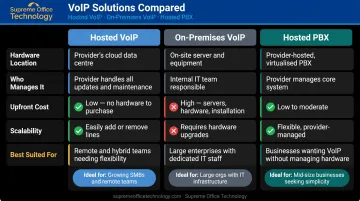
| Hosted VoIP | On-Premises VoIP | Hosted PBX | |
|---|---|---|---|
| Hardware location | Provider's data centers | On-site at your business | Provider's data centers |
| Who manages it | Provider | Your internal IT team | Provider |
| Upfront cost | Low (subscription model) | High (hardware + installation) | Low (subscription model) |
| Scalability | Admin portal changes | Hardware, licenses, IT work | Admin portal changes |
| Best suited for | SMBs, remote/hybrid teams, multi-site | Large enterprises with dedicated IT | SMBs wanting PBX features without hardware |
On-Premises VoIP
On-premises VoIP requires physical servers and PBX hardware installed at your location, managed by your own IT staff. It offers more control and may suit organizations with strict data compliance requirements — but demands significant upfront investment and ongoing technical expertise. For most small and mid-sized businesses without a dedicated IT department, the cost and complexity make it a difficult fit.
Hosted PBX vs. Hosted VoIP
A hosted PBX replicates traditional Private Branch Exchange functions via the cloud — including call routing, extensions, and voicemail. Hosted VoIP is the broader technology that makes this possible. For most SMBs, the practical difference between the two is minimal. Either way, there's no on-site hardware to maintain — calls travel over your internet connection.
Must-Have Features to Look For in a Hosted VoIP Solution
Core Call Management
These features should be on every evaluation checklist:
- Auto attendant — Routes callers automatically without a live receptionist, ensuring no call goes unanswered outside business hours
- Call queues — Holds callers in sequence during high-volume periods rather than sending them to voicemail; often a higher-tier or add-on feature
- Call forwarding — Redirects calls to mobile devices or alternate numbers, essential for remote and hybrid teams
- Voicemail-to-email transcription — Delivers voicemail as readable text, letting staff scan messages without listening to audio
Integrations and Analytics
Look for a provider that connects with tools your team already uses:
- CRM integrations (Microsoft 365, Google Workspace, Salesforce) — logs calls automatically and surfaces communication data inside customer records
- Call analytics — tracks call volume, duration, missed calls, and agent performance to support business decisions
- Call recording — valuable for training and compliance, but not always included in base pricing. Nextiva lists it as an add-on for lower-tier plans; Vonage includes 15 hours per month on their Advanced tier; RingCentral builds it into RingEX. Confirm what's included before signing.
Mobile App and Softphone Support
A softphone app for desktop and mobile is non-negotiable. Employees should be able to use their business number from any device — laptop, smartphone, or tablet — without being tied to a desk phone. For remote and hybrid teams, this flexibility is what makes hosted VoIP genuinely useful day-to-day.
Is Hosted VoIP Right for Your Business?
Who Benefits Most
Hosted VoIP is a strong fit for:
- Businesses with distributed or growing teams across multiple Connecticut locations
- Organizations spending heavily on traditional phone maintenance with unpredictable billing
- Companies with remote or hybrid workers who need full phone functionality away from the office
- Businesses wanting professional call management — auto attendants, call queues, call recording — without complex hardware
Industries with particularly strong fit include legal, healthcare, education, and financial services. Each of these sectors needs reliable, compliant communications — and features like call recording, CRM integration, and mobile access map directly to those needs.

Supreme Office Technology works with Connecticut businesses across all of these verticals, providing hosted VoIP and unified communications that include HD voice, call queues, CRM integration, AI-powered call recording, and mobile softphone access via the UC-One app.
Honest Limitations to Consider
Hosted VoIP depends entirely on your internet connection. Poor bandwidth, high latency, or an unstable ISP can degrade call quality noticeably. Before switching:
- Run a network assessment to check bandwidth, latency, jitter, and packet loss
- Ensure your connection meets the 100 Kbps per concurrent call benchmark
- Consider a failover option — such as call forwarding to mobile — if your internet reliability is inconsistent
Businesses in areas with unreliable connectivity should address network quality before committing to a cloud phone system.
Take the Next Step
Supreme Office Technology offers a no-obligation office technology assessment for Connecticut businesses — typically completed in under an hour at your location. The assessment covers your current phone systems and communications environment, and results in a tailored recommendation based on your team size, call volume, remote work needs, and budget.
To schedule yours, contact Supreme Office Technology at (203) 239-6511, email info@supremeofficetechnology.com, or request an assessment through their website at supremeofficetechnology.com/request-assessment.
Frequently Asked Questions
What is hosted VoIP?
Hosted VoIP is a cloud-based phone service managed entirely by a third-party provider. Calls are made over the internet rather than traditional phone lines. No on-site hardware is required — your provider handles all infrastructure remotely.
What is the difference between VoIP and hosted VoIP?
VoIP is the core technology: voice transmitted as data over IP networks. Hosted VoIP describes the service model, where a provider manages the infrastructure off-site. VoIP is the "how"; hosted VoIP is the "who manages it."
How much does hosted VoIP cost?
Entry and mid-tier plans typically run $15–$40 per user per month, though advanced tiers, call recording add-ons, and contact center bundles can push costs higher. PCMag found tested services ranging from $10 to $65 per person per month depending on features and provider.
What equipment do I need to use hosted VoIP?
The minimum requirements are a reliable internet connection and a compatible device — a computer with a softphone app or a mobile smartphone. Businesses can also use IP desk phones; existing SIP-compatible phones may be reusable if they're unlocked and supported by your provider.
Can I keep my existing business phone number when switching?
Yes. Most hosted VoIP providers support number porting, allowing you to transfer your current phone numbers to the new system. This prevents any disruption for customers or contacts during the transition.
What internet speed do I need for hosted VoIP?
Plan for 100 Kbps of upload and download bandwidth per simultaneous call. Connection stability matters more than raw speed: target latency under 150 ms one-way, jitter below 30–50 ms, and packet loss below 1%.