Introduction
Law offices generate paper at a rate that would overwhelm most other professional environments. A single litigation matter can produce hundreds of pages — discovery documents, pleadings, exhibits, signed retainer agreements, court filings — and that's before you factor in routine client intake. For legal teams, document scanning isn't a convenience; it's infrastructure.
The stakes are real. According to the ABA's 2024 Legal Technology Survey Report, 85% of litigators now use electronic court filing, which means scanner output quality directly affects eFiling compliance.
Choose a scanner that can't produce searchable PDFs at the correct resolution, and you've got a compliance problem on your hands — not an equipment inconvenience you can defer.
This guide covers five document scanners well-suited to law office environments, what distinguishes each one, and the key criteria your firm should evaluate — so you can choose equipment that meets eFiling standards, handles your volume, and holds up under daily legal workloads.
Key Takeaways
- Courts require 300 DPI minimum for scanned documents submitted via eFiling — verify your scanner meets this before purchasing
- OCR-generated searchable PDFs are non-negotiable for legal document management and court submission
- Match scanner capacity to workload — desktop sheetfed for solo/small firms, departmental models for litigation teams
- Confirm TWAIN driver support before buying — it determines compatibility with your practice management and document management software
- Duplex scanning and a high ADF capacity save significant time on multi-page briefs and discovery batches
Why Document Scanners Are Non-Negotiable for Law Offices
A document scanner converts physical paper into electronic files — searchable, storable, and shareable across your firm's systems. For law offices, that capability isn't a convenience — it's a compliance requirement.
eFiling Compliance Requirements
Federal and state courts have specific technical requirements for electronically submitted documents, and not all scanners meet them.
Key requirements vary by jurisdiction:
- Federal (CM/ECF): PACER recommends 300 DPI black-and-white PDF image files for all submitted documents
- New York appellate courts: Scanned PDFs must be 300 DPI and text-searchable, with narrow exceptions for handwritten documents, photographs, and materials containing charts or signatures
- Connecticut Judicial Branch: Accepts PDF and PDF/A documents, with PDF/A expected to become mandatory for eFiling
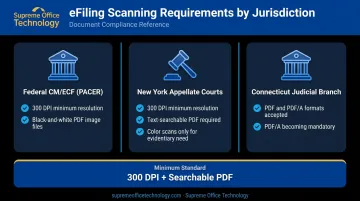
The practical implication: a scanner that produces only image-based PDFs — without OCR-generated text — will create submission problems. Courts increasingly require searchable format, and some explicitly require it.
The Paperless Reality
With 85% of litigators already using electronic filing, the question isn't whether your firm needs scanning capability — it's whether your current setup can handle the volume and meet compliance standards consistently.
The five scanners below were selected based on scan speed, ADF capacity, OCR accuracy, eFiling compatibility, software integration, and reliability under high-volume legal workloads.
Best Document Scanners for Law Offices
Ricoh ScanSnap iX2500 — Best for Small to Mid-Sized Firms
The ScanSnap iX2500 is the dominant desktop scanner in solo and boutique law practice environments. Its combination of ease of use, wireless connectivity, and accurate OCR makes it the most accessible option for firms without a dedicated IT team.
| Spec | Detail |
|---|---|
| Scan Speed | 45 ppm simplex / 90 ipm duplex |
| ADF Capacity | 100 sheets |
| Connectivity | USB, Wi-Fi |
| Output Formats | Searchable PDF, JPEG, editable Word/Excel/PowerPoint |
Key legal features:
- One-button scanning with 5-inch color touchscreen profiles
- Direct cloud integration: Dropbox, OneDrive, Google Drive, SharePoint Online, Box, and more
- Accurate OCR for searchable PDF output
- Wireless operation enables shared access without a dedicated workstation
- Official Clio integration via ScanSnap and Clio Launcher
One limitation worth noting: the ScanSnap iX2500 does not include a TWAIN driver. Firms using document management systems that require TWAIN compatibility — such as NetDocuments via Desktop Scanner Connector — should factor this into the evaluation. Priced at $459.99, it's the entry point for this guide and the right fit for most small to mid-sized practices.
Brother ADS-4900W — Best for High-Volume Scanning Stations
The Brother ADS-4900W is built for throughput. Litigation departments, dedicated scanning stations, and practices handling large discovery batches daily will get more out of this machine than any other option in this guide.
| Spec | Detail |
|---|---|
| Scan Speed | Up to 60 ppm simplex / 120 ipm duplex (letter-size, 300 DPI) |
| ADF Capacity | 100 pages |
| Daily Duty Cycle | Up to 9,000 pages |
| Connectivity | Dual-band Wi-Fi, Ethernet, USB 3.0 |
Key legal features:
- TWAIN, WIA, ISIS, and SANE driver support — broadest compatibility of any scanner in this list
- Scan directly to USB drives without a PC connection
- Bundled with Kofax PaperPort 14SE (with OCR) and Kofax Power PDF v3
- Large color touchscreen for scan-to-folder workflows by case or matter
The ADS-4900W comes in at $799.99 — a meaningful step up from the iX2500. For firms where volume justifies it, the 9,000-page daily duty cycle and full network connectivity make the difference.
Epson DS-1760WN — Best Flatbed/ADF Combination
Most document scanners handle standard paper through a sheet feeder. The Epson DS-1760WN adds an integrated flatbed, and that distinction matters more in legal environments than it might seem at first.
Bound case law volumes, passports, oversized contracts, original deeds, and fragile historical documents can't safely go through a sheet feeder. The DS-1760WN handles both paths in one compact unit.
| Spec | Detail |
|---|---|
| Scan Speed | Up to 30 ppm simplex / 60 ipm duplex (letter-size, 300 DPI via USB) |
| ADF Capacity | 60 pages |
| Daily Duty Cycle | Up to 3,000 pages |
| Connectivity | Wi-Fi, Ethernet, USB |
Key legal features:
- Flatbed + 60-sheet ADF in one unit — handles documents that can't go through a feeder
- Scan to USB thumb drive without a PC
- Network connectivity (Wi-Fi and Ethernet) for shared office use
- Compatible with Document Capture Pro for automated scan workflows
- TWAIN and ISIS driver support
Availability alert: The DS-1760WN is listed as Out of Stock on Epson's US product page at time of publication. Confirm availability before purchasing. Listed price is $599.00.
Ricoh fi-800R — Best for Client-Facing Reception Desks
The fi-800R occupies a different niche than the other scanners here. It's compact, fast at handling thick media, and designed specifically for the kind of document scanning that happens at a reception desk during client intake: IDs, passports, signed intake forms, and retainer agreements.
| Spec | Detail |
|---|---|
| Scan Speed | 40 ppm simplex / 80 ipm duplex (200/300 DPI) |
| ADF Capacity | 20 sheets (standard 80 g/m² paper) |
| Expected Daily Volume | 4,500 sheets |
| Connectivity | USB 3.2 Gen 1x1 |
Key legal features:
- Dual Path Mechanism: U-Turn Scan for standard ADF documents; Return Scan for passports, ID cards, booklets, and thick media up to 5mm — no carrier sleeve needed
- Return Scan speed: approximately 3.5 seconds per sheet at 200/300 DPI
- PaperStream Capture software supports indexed document workflows
- TWAIN, ISIS, WIA, and SANE driver support
- High daily duty cycle (4,500 sheets) far exceeds typical front-desk volumes
The fi-800R runs $533.99 and is purpose-built for one job: intake. It's not a firm's only scanner — pair it with a higher-capacity model and it handles the front desk better than anything else on this list.
Kodak Alaris S2085f — Best for Large Firms and Litigation Departments
The S2085f is in a different category than the other four scanners, both in capability and price. It's a departmental scanner built for large litigation teams, dedicated records departments, and practices processing thousands of pages daily.
| Spec | Detail |
|---|---|
| Scan Speed | 85 ppm simplex / 170 ipm duplex |
| ADF Capacity | 300 sheets |
| Daily Duty Cycle | Up to 20,000 pages per day |
| Connectivity | Ethernet, USB 3.2 Gen 1x1 |
| Flatbed | Integrated A4 flatbed |
Key legal features:
- Integrated A4 flatbed for bound case law books, fragile originals, and oversize exhibits
- Intelligent document protection prevents jams on delicate materials
- Smart Touch software enables one-button routing to practice management or DMS destinations
- Optional Kodak Capture Pro for enterprise content management integration
- TWAIN, ISIS, WIA, and SANE driver support
At $2,780.00, the S2085f is a serious investment — overkill for a solo practitioner, but the right tool for a litigation support team processing discovery at scale, where downtime and throughput limitations carry real cost.
Key Features to Look for in a Law Office Document Scanner
Optical Resolution and eFiling Compliance
PACER recommends 300 DPI for scanned PDFs submitted via CM/ECF. State courts may impose their own standards — New York appellate courts, for example, require 300 DPI and black-and-white unless color is needed for evidentiary purposes. Verify the current requirements for every court your firm files in before finalizing a scanner purchase.
All five scanners in this guide meet the 300 DPI threshold. For exhibits or photographs where higher resolution is appropriate, confirm the scanner's maximum optical resolution.
OCR and Searchable PDF Output
New York courts require that all submitted PDFs be text-searchable, with OCR applied to any scanned document. California's Santa Clara County Superior Court requests searchable PDF and prefers searchable PDF/A.
Beyond court requirements, searchable PDFs are how attorneys find documents quickly — keyword searches across a case file rather than page-by-page review. OCR quality varies between software suites; Kofax PaperPort (bundled with the Brother ADS-4900W) and PaperStream Capture (Ricoh fi-800R) are both deliver strong OCR accuracy.
ADF Capacity and Duty Cycle
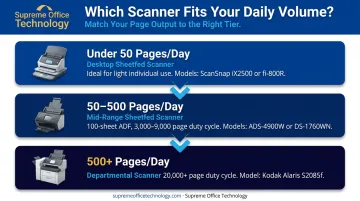
Match these specs to your actual daily volume:
- Under 50 pages/day: Any desktop sheetfed scanner works — the ScanSnap iX2500 or fi-800R will handle it
- 50–500 pages/day: Mid-range sheetfed with a 100-sheet ADF and 3,000–9,000 page duty cycle — the Brother ADS-4900W and Epson DS-1760WN both qualify
- 500+ pages/day: Departmental scanner with high ADF capacity and 20,000+ page duty cycle — the Kodak Alaris S2085f is built for this load
Software Integration and Driver Support
Hardware specs matter, but a scanner's real-world value depends on whether it integrates with your firm's existing systems.
- NetDocuments: Supports any TWAIN scanner via Desktop Scanner Connector
- Clio: Has certified integration with ScanSnap via Clio Launcher
- iManage: Partners with EzeScan for scanner-to-iManage workflows
Scanners with TWAIN, WIA, and ISIS drivers have the broadest compatibility. One exception worth flagging: the ScanSnap iX2500 lacks TWAIN support. Verify compatibility with your specific DMS before purchasing.
Security and Confidentiality
ABA Model Rule 1.6(c) requires reasonable efforts to prevent unauthorized disclosure of client information. For networked scanners shared across a firm, look for:
- User authentication before scanning
- Encrypted file transmission to destinations
- Secure scan-to-folder or scan-to-cloud with access controls
- Audit logging of scan activity
How to Choose the Right Scanner for Your Firm
The most common mistake law firms make when selecting a scanner is evaluating on price or brand name alone, without matching the specs to actual daily page volume and software environment. A $400 scanner that can't produce searchable PDFs, or that lacks TWAIN support for your DMS, will create manual workarounds that cost far more in staff time than the upfront savings.
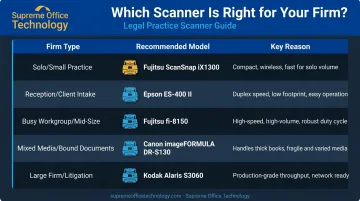
Quick selection framework:
| Firm Type | Recommended Model | Why |
|---|---|---|
| Solo / small practice | Ricoh ScanSnap iX2500 | Easy setup, wireless, Clio integration |
| Reception / client intake | Ricoh fi-800R | ID/passport scanning, compact footprint |
| Busy workgroup / mid-size firm | Brother ADS-4900W | High duty cycle, broad driver support |
| Mixed media / bound documents | Epson DS-1760WN | Flatbed + ADF combo |
| Large firm / litigation department | Kodak Alaris S2085f | 300-sheet ADF, 20,000 pages/day |
For Connecticut law firms, Supreme Office Technology offers no-obligation office assessments to match the right scanner to your actual workflow. Serving New Haven, Waterbury, and Middletown for over 40 years, they can give you a grounded recommendation without the guesswork.
Conclusion
The right document scanner for a law office isn't the most expensive model or the one with the longest feature list. It's the one that matches your firm's daily volume, document types, software stack, and eFiling requirements.
Beyond the hardware itself, treat this as a long-term infrastructure decision. Factor in software compatibility, maintenance availability, and whether the vendor can support your firm as volume grows — a scanner that fits today but can't scale often means a forced replacement within a few years.
Getting that fit right is easier with someone who knows the equipment. Connecticut law firms can contact Supreme Office Technology at (203) 239-6511 or info@supremeofficetechnology.com to schedule a no-obligation office assessment and get a recommendation tailored to your practice's specific scanning needs.
Frequently Asked Questions
Which scanner is best for office use?
For most small to mid-sized offices, a sheetfed desktop scanner with an ADF — like the Ricoh ScanSnap iX2500 — hits the right balance of speed, usability, and price. High-volume environments, or firms processing hundreds of pages daily, should look at the Brother ADS-4900W or Kodak Alaris S2085f instead.
What DPI resolution do I need for eFiling court documents?
PACER recommends 300 DPI for PDF image files submitted via CM/ECF. State courts set their own standards — New York appellate courts mandate 300 DPI black-and-white with searchable text. Always verify the current requirements for the specific court you're filing with before purchasing.
Do law offices need a dedicated scanner or can they use a multifunction printer?
Dedicated document scanners typically offer faster scan speeds, higher ADF capacity, more accurate OCR software, and better document management integration than MFP scan functions. For firms with regular or high-volume scanning needs, a dedicated scanner is the more practical choice.
What features should a law firm look for in a document scanner?
Prioritize these four essentials:
- Minimum 300 DPI optical resolution with duplex scanning
- Automatic document feeder sized to your daily workload
- OCR with searchable PDF output
- TWAIN/WIA/ISIS driver support compatible with your practice management system
How much should a law office budget for a document scanner?
Entry-level desktop sheetfed scanners suitable for light use start around $400–$500. Mid-range models with stronger ADF capacity and OCR fall in the $500–$900 range. Departmental and high-volume scanners run $1,000 and above.
Can law office scanners integrate with practice management software?
Most modern scanners connect to legal practice management platforms via TWAIN drivers, certified integrations, or cloud scanning. Clio has a certified ScanSnap integration; NetDocuments supports any TWAIN-compatible scanner. Confirm compatibility with your specific software before buying.