The result is a compounding set of problems. Print costs go untracked. Confidential documents sit unclaimed in output trays. Client billing provisions for printing go unenforced. Devices fail at the worst possible moments.
This guide explains what managed print services are, why law firms specifically need them, how the process works from assessment through ongoing management, and what to look for when choosing a provider.
Key Takeaways
- MPS covers your full print operation — hardware, supplies, security, and workflows — managed by a single provider
- Law firms face print challenges a standard copier lease cannot solve: confidentiality obligations, matter-based billing, and time-sensitive high-volume jobs
- A no-cost print assessment identifies gaps and cost drivers before any solution is recommended
- Core capabilities include secure print release, audit trails, automated toner replenishment, and client matter cost tracking
- Local providers with legal industry experience deliver faster response times than generic national support models
What Is Managed Print Services?
Managed print services (MPS) is a service model where a provider takes full responsibility for managing all printing and imaging devices — hardware, toner and supplies, maintenance, security, and workflow software — under a predictable contract structure.
For law firms, this means predictable print costs, fewer device disruptions, and stronger document security — without pulling attorneys or administrators away from client work to deal with print management.
How MPS Differs from a Copier Lease
Law firms often sign a copier lease expecting ongoing support — and discover too late that a lease is just equipment access. Here's what each actually covers:
| What a Lease Provides | What MPS Adds |
|---|---|
| Equipment access | Ongoing device monitoring |
| Basic maintenance | Proactive issue prevention |
| Toner (sometimes) | Automated supply replenishment |
| An invoice | Usage reporting by user/department |
| Hardware | Security enforcement and audit trails |
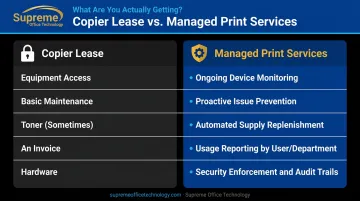
A lease provides equipment. MPS provides ongoing management. That gap becomes obvious the moment a printer goes down mid-trial prep, or when a firm administrator can't answer a simple question: what does printing actually cost us each month?
The Unique Print Challenges Law Firms Face
Volume and Urgency
Legal professionals regularly face last-minute, high-volume print jobs tied to trials, mediations, and filing deadlines. A print environment that slows or fails during trial prep creates real operational risk — not just inconvenience. The pressure is different from a typical office environment because the timing is non-negotiable.
Confidentiality and Compliance
ABA Model Rule 1.6 requires lawyers to make reasonable efforts to prevent inadvertent or unauthorized disclosure of client information. Printed documents represent a documented vulnerability: unclaimed output tray jobs, unsecured printed files, and devices without authentication all create exposure.
ABA Comment 18 frames this as a risk-based obligation. Reasonableness is evaluated against three factors:
- Sensitivity of the information involved
- Likelihood of disclosure without safeguards in place
- Cost and difficulty of implementing those protections
Each of these factors has a direct equivalent in print security decisions — from device authentication to secure release printing.
Connecticut firms have additional considerations: CBA File Retention Guidelines require keeping defined document categories for seven years, with written notice required before destroying certain materials. That means how printed client documents are tracked, stored, and disposed of carries compliance weight — not just administrative habit.
The Client Billing Recovery Gap
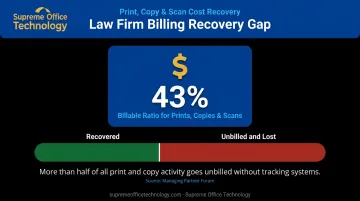
Many law firms have billing provisions that allow them to recover printing and copying costs from clients per matter. Most don't capture that revenue reliably. Legal-operations research from Managing Partner Forum reports a 43% billable ratio for copies, prints, and scans — meaning more than half of print and copy activity is going unbilled. Without tracking systems in place, that revenue leakage is invisible and ongoing.
How Managed Print Services Works for a Law Firm
MPS follows a structured lifecycle — assessment, solution design, implementation, and ongoing optimization — so the fit improves over time rather than degrading after the initial install.
Step 1: Print Assessment and Fleet Audit
Every reputable MPS engagement starts here. A thorough audit covers:
- Device inventory and physical locations across the firm
- Usage volumes by department or practice group
- Current cost-per-page rates across all devices
- Supply and maintenance costs, including staff time spent managing print issues
- Downtime history and security protocols currently in place
A trustworthy provider conducts this assessment at no cost . The data drives the recommendation — a custom solution, not a standard package.
Supreme Office Technology offers this as a no-pressure, on-site Office Document Assessment, typically completed in under an hour. The output is an in-depth improvement plan identifying specific cost savings and efficiency opportunities for the firm.
Step 2: Solution Design and Implementation
Assessment findings determine what gets deployed:
- Multifunction devices (MFDs) sized to actual usage — covering print, scan, copy, and secure fax
- Secure release printing, duplex defaults, and color access controls configured firm-wide
- Client/matter billing integration mapped to the firm's specific billing structure
- Onboarding and staff training to minimize workflow disruption at go-live
PaperCut, which Supreme Office Technology carries as an authorized software partner, handles the client billing and secure release layer directly. Its Professional Client Billing module allows attorneys and staff to assign print, copy, scan, and fax costs to a specific matter at the device — at the time of the job.
Step 3: Ongoing Management and Optimization
Ongoing management is what separates MPS from a standard equipment contract:
- Remote monitoring flags device issues before they affect the floor
- Automated toner replenishment eliminates last-minute supply scrambles
- Usage reporting breaks down print costs by user, department, or client matter
- Fleet adjustments as the firm grows, adds locations, or restructures practice groups
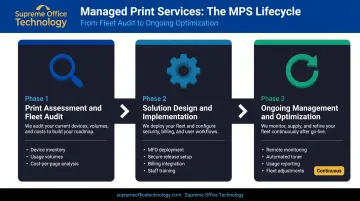
As the firm's needs shift, the program shifts with them — no renegotiating from scratch.
Key Benefits of Managed Print Services for Legal Practices
Security and Compliance
MPS enforces security through layers that a standard printer deployment doesn't include:
- User authentication via PIN code or badge swipe before any job releases
- Secure print release — jobs print only when the authorized user is physically present at the device
- Encrypted data transmission between workstations and devices
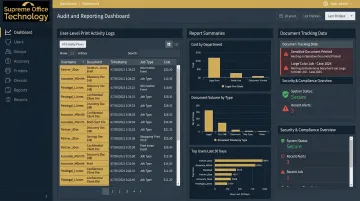
- Full audit trails logging every print action, by user, device, and time
PaperCut's audit capabilities let administrators see who printed what, when, and on which device — with 80 pre-built reports available. Document watermarking can embed the user's ID into every printed page, creating an additional chain-of-custody record. Together, these controls directly support the ABA's reasonable efforts standard under Rule 1.6 — and audit logs serve a practical defensive purpose: documenting internal document handling practices if a malpractice claim or ethics inquiry arises.
Client Billing and Cost Recovery
MPS platforms track print and copy activity by client matter code. When a billing provision exists in the client agreement, that activity becomes automatically and accurately billable.
This feature alone often offsets a meaningful portion of MPS costs. Firms without a reliable system to capture per-matter print costs miss recoverable expenses every billing cycle. With PaperCut's client billing module, cost recovery happens at the point of printing, not retroactively.
Predictable Cost Control
MPS consolidates costs into a single, fixed cost-per-page contract covering hardware, supplies, maintenance, and service — replacing:
- Unpredictable repair bills
- Emergency toner purchases at retail prices
- Fragmented invoices from multiple vendors
- Staff time spent managing print problems
Fleet right-sizing — consolidating devices based on actual usage data — typically reduces total device count and associated overhead further.
Workflow Productivity and Hybrid Work
During trial prep or a filing deadline, a functional print environment isn't an administrative convenience — it's an operational requirement. Eliminating downtime and supply shortages gives paralegals, legal assistants, and associates more time on billable tasks.
Modern MPS solutions also support hybrid and remote work:
- Secure printing from mobile devices
- Cloud scan-to-email and cloud storage routing (including Microsoft 365 and Google Workspace)
- Job routing to the nearest available device
Konica Minolta's A3 lineup — the 2025 Line of the Year from Keypoint Intelligence, deployed by Supreme Office Technology — is built for hybrid environments, with cloud connectivity and mobile printing standard across the platform.
How to Choose the Right MPS Provider for Your Law Firm
Legal Industry Experience
Not all MPS providers understand legal workflows. Ask prospective providers:
- Do they have current law firm clients they can reference?
- Do they understand matter-based billing and how to configure tracking software for it?
- Have they worked with Connecticut firms familiar with CBA file retention requirements?
Supreme Office Technology has served Connecticut law firms including Casner & Edwards LLP and Certilman, Balin, Adler & Hyman — both documented Konica Minolta MPS engagements focused on document security, operational efficiency, and cost reduction. That hands-on experience with legal billing structures and compliance requirements shapes how they configure and support your environment from day one.
Security Capabilities
Security requirements for law firms go well beyond standard office settings. Confirm each provider can address:
- Secure print release options (PIN, badge, smartphone)
- Audit trail depth and reporting capabilities
- Data encryption on devices
- End-of-lease data destruction — how are hard drives wiped or destroyed when devices are returned? This step is commonly overlooked and represents a real confidentiality risk.
Local Responsiveness
A printer failure during trial prep has consequences. Response time isn't just a convenience metric in legal environments — it's a risk factor.
Ask about guaranteed service response windows, whether a local technician will be dispatched, and how supply replenishment is handled. Supreme Office Technology dispatches certified on-site technicians across New Haven, Waterbury, and Middletown, CT, with proactive remote monitoring to catch issues before they require emergency calls.
A national 1-800 support model rarely offers the same accountability as a local provider with a physical service presence and named technicians.
Assess the Assessment
A trustworthy MPS provider leads with a no-obligation print audit. Providers who skip this step and propose a standard package are not customizing to your firm's actual situation.
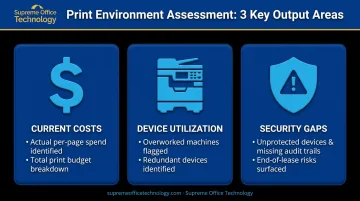
The assessment should produce clear data across three areas:
- Current costs — actual per-page spend and total print budget
- Device utilization — which machines are overworked or redundant
- Security gaps — unprotected devices, missing audit trails, or end-of-lease risks
That baseline is what gives you a meaningful way to evaluate any improvements a provider claims to deliver.
Common Misconceptions and When MPS May Not Fit
"MPS Is Only for Large Firms"
Small and mid-sized law firms often benefit from MPS more proportionally than large ones do. They lack dedicated IT or facilities staff to manage print environments, making outsourced management particularly valuable. The ABA's 2024 Solo and Small Firm TechReport confirms that solo and small firms generally have fewer security features and policies than larger firms — precisely the gap MPS addresses.
"MPS Is Just a Printer Lease with Better Marketing"
The ongoing management, security enforcement, usage reporting, and billing integration are substantively different from equipment financing. A lease gives you a device. MPS manages what that device does — and who can use it, how, and at what cost.
When MPS May Not Be the Right Fit
MPS isn't the right solution for every firm. Two situations where it may not deliver enough value:
- A solo practitioner with minimal print volume and no client billing complexity may not generate enough activity to justify a managed contract
- A firm that has already invested in modern, well-maintained devices with existing IT management may see limited incremental ROI
A print assessment is the most reliable way to find out — it gives you actual data rather than assumptions in either direction.
Frequently Asked Questions
What are print management solutions?
Print management solutions are tools and services that give organizations oversight and control over their printing operations — covering device monitoring, usage tracking, security enforcement, and cost reporting. For law firms, they typically combine software (for tracking and security) with managed services (for maintenance and fleet optimization).
How much do managed print services cost?
MPS is typically priced on a cost-per-page model that bundles hardware, supplies, maintenance, and service into a predictable monthly cost. The actual figure depends on fleet size, print volume, and service level. A print assessment is the starting point for any accurate cost comparison against current spend.
What printers do law firms use?
Law firms typically rely on multifunction devices (MFDs) that combine printing, scanning, copying, and faxing in a single machine. High-volume laser MFDs are standard for main office use; desktop printers may supplement individual workstations. Under MPS, device selection is driven by actual usage data from the assessment — not assumptions.
Is managed print services worth it for small law firms?
Small law firms often see disproportionate benefit from MPS because they lack dedicated administrative resources to manage print infrastructure. Security features, predictable costs, and reduced downtime are valuable at any scale, and the cost is typically offset by recovered client billing and avoided emergency repair expenses.
How do managed print services help with client billing in law firms?
MPS platforms track print and copy activity by client matter code, so firms can calculate and recover costs that would otherwise go unbilled — particularly useful when client agreements include billing provisions for printing but no reliable system exists to capture them.