Introduction
Paper records create real operational problems. Staff spend time hunting for misplaced charts, filing cabinets multiply faster than square footage allows, and a single misfiled document can compromise patient care or trigger a regulatory investigation. For healthcare organizations, this isn't just an inconvenience—it's a compounding liability.
Medical records scanning is the process of converting paper-based patient files into secure, searchable digital formats that integrate with existing electronic health record (EHR) or electronic medical record (EMR) systems. It addresses the administrative, clinical, and compliance pressures that paper-based systems create simultaneously.
That transition is already the norm. According to the CDC's 2024 National Electronic Health Records Survey, 95% of U.S. office-based physicians have adopted EHR systems. ONC data puts certified EHR adoption among non-federal acute care hospitals above 99%.
For any organization still managing paper records, the gap between current practice and the standard of care is widening fast.
What follows is a practical breakdown of the scanning workflow, HIPAA compliance requirements, measurable operational benefits, and what to look for when selecting equipment for your facility.
Key Takeaways
- Medical records scanning converts paper patient files into secure, searchable digital records that cut retrieval time and support better care delivery.
- A complete scanning workflow covers document preparation, digitization, indexing, and EHR/EMR integration.
- Digital records support HIPAA compliance through access controls, encryption, and audit trails that paper cannot provide.
- Healthcare organizations can scan records in-house, outsource to a service bureau, or use a hybrid approach.
- Scanner selection should account for throughput speed, image quality, OCR capability, and system integration.
The Hidden Costs of Paper-Based Medical Records
Paper records carry costs that rarely appear on a single budget line but accumulate steadily across every department that touches them.
Administrative Burden
Every manual chart pull, re-filing task, and physical search takes clinical and administrative staff away from patient-facing work. The ONC notes that EHRs reduce chart pull, storage, and re-filing costs as a primary efficiency benefit—and the inverse is also true: organizations still running paper systems absorb those costs daily. An older AHRQ benchmark estimated that eliminating 600 manual chart pulls annually saved approximately $3,000 at $5 per pull, and that figure reflects 2003 costs.
Security and Liability Exposure
Physical records are vulnerable to risks that digital systems handle by design:
- Theft or unauthorized access — anyone with physical access to a file room can view records
- Fire and flood damage — irreplaceable patient histories can be destroyed permanently
- No log of who accessed, modified, or removed a record exists with paper files
- Once a record leaves its folder, there's no way to revoke access remotely
The Single-User Bottleneck
Beyond security risks, paper creates a basic operational constraint: a record can only be in one place at a time. When billing, nursing, and a specialist all need the same chart simultaneously, someone waits. In busy clinical environments, those delays compound across hundreds of patients per week.
HIPAA Penalty Exposure
Organizations that lose or mishandle physical records face significant financial consequences. Under the January 2026 HHS final rule, HIPAA civil money penalties range from $145 per violation for unknowing violations up to $2,190,294 per calendar year for uncorrected willful neglect. HHS OCR has collected over $144 million in settlements and penalties through enforcement actions. Digitizing records eliminates many of the physical vulnerabilities that create this exposure in the first place.
The Medical Records Scanning Process: Step by Step
Step 1 — Inventory and Prioritization
Before a single page goes through a scanner, identify which records to digitize first. Active patient files, high-risk charts, and records approaching legal retention deadlines typically take priority. Separate anything already in electronic format to avoid duplication.
Step 2 — Document Preparation
Physical prep determines scan quality. Per AHIMA's Document Management and Imaging Toolkit, preparation includes:
- Removing staples, paperclips, and binding
- Repairing torn or damaged pages
- Confirming patient name, medical record number, and account number on each page
- Grouping like document types together (lab results, imaging orders, physician notes, billing)
- Covering third-party barcodes to prevent misread during scanning
- Substituting white paper covers for documents that need it
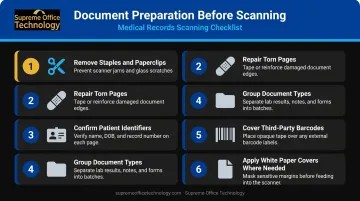
Thorough prep reduces errors downstream and prevents re-scanning.
Step 3 — Scanning and Image Capture
With prep complete, production-grade document scanners take over. Quality scanners handle mixed document sizes, apply automatic image enhancement, and capture metadata in-line—reducing the need to pre-sort by document type. Choose a device whose rated daily volume matches your actual workload; undersized scanners create bottlenecks that slow the entire project.
Step 4 — Indexing
Scanning creates an image. Indexing makes it findable. Tag each scanned file with key metadata fields:
- Patient name and date of birth
- Medical record number
- Record type (lab, imaging, clinical note, billing)
- Visit or service date
OCR (Optical Character Recognition) software converts scanned images into searchable text, allowing staff to retrieve records through keyword search rather than manual browsing. AHIMA identifies OCR and bar coding as key technologies that enhance document capture productivity.
Step 5 — Storage and EHR/EMR Integration
Indexed records move into a secure repository—on-premises or cloud-based—and integrate with the organization's EHR or EMR platform. Authorized staff can then access complete patient histories from any device, at any location. AHIMA recommends 100% quality review of images after initial scanning, followed by ongoing random monitoring to catch errors before they affect patient care.
Key Benefits of Medical Records Scanning
Faster Clinical Decisions
When a provider can pull a patient's full history—lab results, imaging, medication records, physician notes—in seconds rather than minutes, diagnostic confidence improves. Delays in record retrieval create delays in treatment decisions; eliminating that gap directly supports better outcomes.
Reduced Administrative Costs
Physical file storage generates ongoing costs: filing cabinets, off-site storage facilities, paper, and the staff time to manage all of it. The ONC explicitly lists reduced chart pull, storage, and re-filing costs among the measurable efficiencies associated with EHR adoption.
Digital storage eliminates the physical footprint and the recurring expense that comes with it.
Simultaneous Multi-Department Access
Digital records remove the single-user bottleneck entirely. Billing, compliance, nursing, and clinical staff can access the same record at the same time without coordination or delays. Automated workflows can route documents to the appropriate department without manual intervention.
Disaster Recovery
ONC documented that Hurricane Sandy destroyed paper medical records across affected facilities, while organizations with digital records maintained continuity. Research from the VA after Hurricane Katrina found that electronic health records supported ongoing care for displaced veterans through preserved pharmacy and laboratory data. When infrastructure fails, digital records remain accessible — paper does not.
Data-Driven Care
Structured digital records enable capabilities that paper never could:
- Identify high-risk patients before conditions escalate
- Track population health trends across patient cohorts
- Support value-based care reporting with analyzable data
- Feed clinical decision support tools with complete records
HIPAA Compliance and Data Security in Medical Records Scanning
HIPAA compliance spans two distinct regulatory frameworks, and a proper medical records scanning program needs to address both.
Privacy Rule and Security Rule
The HIPAA Privacy Rule establishes national standards protecting individually identifiable health information held in any form or media. The HIPAA Security Rule specifically governs electronic protected health information (ePHI), requiring covered entities and business associates to implement administrative, physical, and technical safeguards to ensure confidentiality, integrity, and availability.
The HITECH Act (2009) strengthened HIPAA enforcement and expanded liability to business associates — meaning any scanning vendor handling ePHI on your behalf must also meet these standards.
Why Digital Records Are More Secure Than Paper
Digital systems offer compliance controls that paper cannot match:
- Role-based access controls — only authorized users can view specific record types
- End-to-end encryption — data protected in transit and at rest
- Automatic audit trails — a complete log of who accessed, viewed, or modified every record
- Remote access revocation — credentials can be disabled immediately when staff depart
- User authentication — multi-factor verification before record access
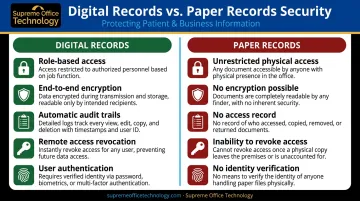
For audits and breach investigations, that audit trail alone can be the difference between a defensible compliance posture and significant exposure.
Compliance During the Transition
The conversion period itself requires care. Best practices include:
- Using HIPAA-compliant scanning equipment and vendors
- Establishing chain-of-custody protocols for records moving through the digitization process
- Storing scanned files in encrypted, access-controlled repositories before destroying originals
- Destroying originals only after confirming compliance with applicable federal, state, and organizational retention schedules
Retention schedules vary by jurisdiction, and Connecticut organizations must account for both levels:
| Requirement | Retention Period |
|---|---|
| Connecticut Public Health Code § 19a-14-42 | 7 years from last date of treatment |
| Federal CMS Conditions of Participation | At least 5 years |
When requirements conflict, the more stringent standard applies — in Connecticut, that means 7 years in most cases.
Choosing the Right Scanning Equipment for Your Healthcare Organization
Key Technical Criteria
When evaluating production document scanners for medical records work, focus on:
- Throughput speed (pages per minute) — must match your daily volume; undersized equipment creates bottlenecks
- Image resolution and enhancement — consistent quality across different paper conditions and ages
- Mixed-document handling — medical records include varied sizes, weights, and conditions
- Double-feed detection — catches multi-page feeds that would skip records entirely
- Built-in OCR capability — enables searchable text without separate software licensing
AHIMA advises that scanner speed and functionality should be selected based on daily volume and workload—there's no universal specification that fits all facilities.
In-House vs. Outsourced Scanning
| Approach | Best For | Trade-offs |
|---|---|---|
| In-house scanning | Ongoing day-forward records; smaller practices | Higher control over PHI; requires equipment investment |
| Outsourced service | Large historical backlogs | Faster initial conversion; requires HIPAA-compliant vendor |
| Hybrid | Most mid-to-large organizations | Balances control and scale |
Smaller practices with manageable volumes often find in-house scanning cost-effective and preferable for maintaining direct control over sensitive patient information. Larger health systems with millions of historical records frequently outsource the initial backfile conversion while handling ongoing scanning in-house.
Working with a Local Equipment Partner
For Connecticut healthcare organizations evaluating in-house scanning equipment, working with a local authorized dealer offers advantages that a catalog purchase or national vendor cannot. Supreme Office Technology has served New Haven, Waterbury, Middletown, and surrounding Connecticut communities since 1982. Their Konica Minolta production scanners and multifunction devices include systems recognized with 2025 BLI Pick Awards from Keypoint Intelligence.
Their team supports healthcare organizations through every stage of implementation:
- Hands-on equipment assessment matched to your volume and record types
- Workflow configuration, including OCR setup and scan-to-EHR integration via Dispatcher Phoenix Rx Shield
- Staff training tailored to clinical and administrative users
- Local service response when equipment issues arise
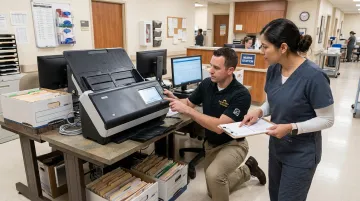
For healthcare organizations where downtime is not an option, on-site support from a local team means faster resolution than remote-only vendors can offer.
Frequently Asked Questions
What types of documents are included in medical records scanning?
Medical records scanning covers physician notes, lab reports, imaging orders, prescription histories, insurance and billing documents, intake forms, and consent forms—any paper document that is part of the patient's care record.
Is medical records scanning HIPAA compliant?
Yes. When performed with HIPAA-compliant equipment and protocols—including secure chain of custody, encrypted storage, and role-based access controls—medical records scanning meets HIPAA requirements. Most organizations find their overall compliance standing improves compared to managing paper-based systems.
How long does it take to digitize a large backlog of medical records?
Timelines vary based on record volume, document condition, and scanner throughput. Most organizations benefit from a phased approach, prioritizing active and high-risk records first. A structured project plan with clear volume milestones helps keep large conversions on track.
Should we scan records in-house or use an outsourced scanning service?
In-house scanning gives you ongoing control and keeps new records digital from day one. Outsourcing is often ideal for large historical backlogs. Many organizations use both: outsource the initial conversion, then manage new records in-house with production equipment.
How are scanned medical records indexed so staff can find them quickly?
Records are tagged with metadata fields—patient name, date of birth, record type, and visit date—and OCR software converts scanned images into searchable text. Staff retrieve records through a document management system or directly within their EHR platform.
What happens to original paper records after scanning?
Original records should not be destroyed until applicable retention requirements are satisfied. In Connecticut, most medical records must be retained for 7 years from the last date of treatment. After confirmed compliance with retention rules, secure shredding (with a certificate of destruction) is standard practice.