Healthcare organizations face a clear operational challenge: managing PHI across its entire lifecycle — capture, storage, sharing, and destruction — while staying audit-ready and avoiding violations that carry both financial and reputational consequences.
The right HIPAA-compliant document management software addresses all of this. This article profiles five solutions worth evaluating, explains what genuine HIPAA compliance actually requires, and helps you match a platform to your organization's specific needs.
Key Takeaways
- HIPAA-compliant DMS platforms require encryption, role-based access, audit trails, and a signed Business Associate Agreement (BAA)
- Each of the five platforms reviewed fits a different organizational size, budget, and workflow profile
- BAA availability varies by vendor plan — confirm this before committing to any platform
- A local technology partner can handle vendor selection, integration, and ongoing compliance support in one relationship
What Is HIPAA-Compliant Document Management Software?
HIPAA-compliant document management software is purpose-built for storing, accessing, sharing, and destroying PHI in accordance with federal law. Generic tools — standard cloud storage, basic file-sharing platforms — simply don't carry the security architecture federal law demands.
The Three Safeguard Pillars Every DMS Must Address
Per HHS's HIPAA Security Rule, compliant systems must satisfy three categories of safeguards:
| Safeguard Category | What It Covers | DMS Application |
|---|---|---|
| Administrative | Policies, workforce training, risk assessments, access management | User provisioning, training documentation, risk analysis workflows |
| Physical | Facility access, device security, secure media disposal | Hardware security controls, secure data center hosting, encrypted storage media |
| Technical | Encryption, access controls, audit logs, transmission security | AES-256 encryption, role-based permissions, immutable activity logs, TLS in transit |
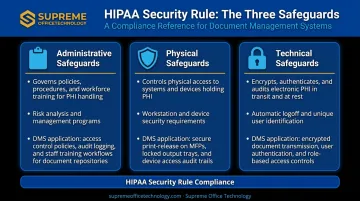
A platform that checks only the technical boxes without supporting administrative and physical safeguards is not genuinely HIPAA-compliant — it's just secure software. The five solutions below each address all three pillars, though how well they fit your organization depends on size, workflow, and existing infrastructure.
Top 5 HIPAA-Compliant Document Management Software Solutions
These five platforms were selected based on HIPAA compliance architecture, BAA availability, security depth, usability, and fit across different organizational sizes and workflow types.
1. DocuWare
DocuWare is an enterprise-grade document management platform with a dedicated healthcare solution covering patient record archiving, invoice processing, and HR document workflows. It supports both cloud and on-premises deployment — an important distinction for organizations with infrastructure requirements or data residency concerns.
ML-powered intelligent indexing automatically tags PHI-related metadata at capture, cutting manual data entry errors before they reach the record. Integration with Microsoft Office and scanning hardware means clinical and administrative staff can work within tools they already use.
DocuWare was named a Challenger in the 2026 Gartner Magic Quadrant for Document Management, and its compliance page confirms support for HIPAA and HITECH requirements.
| DocuWare | |
|---|---|
| Key Features | ML-powered auto-indexing, digital document editing with version control, Microsoft Office and scanning hardware integration, mobile app access |
| HIPAA Compliance | AES-256 encryption, TLS for data in transit, customizable role-based permissions, full audit trails |
| Best Suited For | Mid-to-large healthcare organizations needing robust document capture, indexing automation, and enterprise-scale archiving |
Note: Confirm current BAA terms directly with DocuWare before deployment, as plan-specific conditions may apply.
2. Box for Healthcare
Box for Healthcare is a cloud-based content management platform built for secure file storage, sharing, and collaboration across healthcare teams and organizations. It's designed for environments where multiple departments — or external partners — need controlled access to patient records and clinical documents from any device.
BAAs are available for customers on Enterprise, Enterprise Plus, or Enterprise Advanced plans. Box was named a Leader in the 2026 Gartner Magic Quadrant for Document Management and a Leader in The Forrester Wave: Content Platforms, Q1 2025.
| Box for Healthcare | |
|---|---|
| Key Features | Cloud file storage and sharing, collaboration tools, broad third-party integrations, mobile access, granular folder-level permissions |
| HIPAA Compliance | BAA available (qualifying plans), AES-256 encryption at rest, TLS in transit, two-factor authentication, detailed activity audit logs |
| Best Suited For | Healthcare organizations requiring secure cloud collaboration across departments, external partners, or multiple locations |
3. M-Files
M-Files takes a metadata-driven approach to document management, using AI to automatically organize and retrieve documents based on context rather than folder structure. For healthcare organizations managing large volumes of diverse clinical and administrative records, this reduces the time staff spend searching for documents and eliminates inconsistent manual tagging.
Every document interaction is logged in a full audit trail, and access is available via web browser and mobile (iOS and Android). M-Files was also named a Leader in the 2026 Gartner Magic Quadrant for Document Management.
| M-Files | |
|---|---|
| Key Features | AI-powered metadata extraction from digital and scanned documents, centralized storage for multiple file formats, version control, powerful search, cross-platform mobile access |
| HIPAA Compliance | Role-based permission controls, end-to-end encryption, comprehensive audit trails, support for HIPAA technical safeguard requirements |
| Best Suited For | Healthcare organizations with large, varied document libraries needing intelligent auto-classification and fast metadata-driven retrieval |
Note: Official M-Files sources reviewed did not publicly confirm BAA availability. Verify directly with M-Files before processing PHI on the platform.
4. SmartVault
SmartVault is a cloud-based document management and client portal solution designed for organizations that regularly share sensitive documents with external parties — patients, referring providers, billing partners, or payers. It makes a standardized BAA available for healthcare organizations and holds SOC 2 Type 2, ISO 27001, and ISO 22301 certifications.
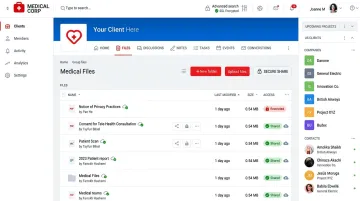
Its branded client portal, built-in e-signature functionality, and email alerts for upload and download events make it particularly well-suited for patient-facing workflows where external document access needs to be both convenient and tightly controlled.
| SmartVault | |
|---|---|
| Key Features | Cloud storage with version control, branded client portal, e-signature functionality, automatic backup, file lock to prevent unauthorized edits, email activity alerts |
| HIPAA Compliance | BAA available, AES-256 encryption at rest and in transit (SSL), automatic secure backup, customizable access permissions, complete audit history |
| Best Suited For | Healthcare practices, clinics, and billing services needing secure patient-facing document portals and streamlined e-signature workflows |
5. DocuSign for Healthcare
DocuSign for Healthcare focuses on eliminating paper-based bottlenecks in patient intake, consent management, and care coordination. It combines HIPAA-compliant e-signatures with secure document storage to create fully paperless workflows — covering everything from intake forms and authorization documents to provider contracts.
Native integrations with healthcare platforms — available via API and interoperability partners — allow it to connect with existing EHR systems. Every agreement generates an automated audit trail and Certificate of Completion.
BAA access requires enhanced or custom sales plans. HIPAA compliance is not available on Personal, Standard, or Business Pro self-service plans.
| DocuSign for Healthcare | |
|---|---|
| Key Features | HIPAA-compliant e-signatures, secure document storage, native healthcare platform integrations, mobile-friendly interface, templated workflow automation |
| HIPAA Compliance | BAA available (higher-tier plans), 256-bit encryption in transit and at rest, role-based access controls, full audit trail for every document and signature event |
| Best Suited For | Healthcare organizations prioritizing paperless patient intake, consent management, and e-signature workflows integrated with existing EHR systems |
How to Choose the Right HIPAA-Compliant DMS
Selecting a platform based on brand recognition alone is one of the most common — and costly — mistakes healthcare buyers make. A platform can be marketed as "HIPAA compliant" while still lacking the specific controls your organization needs.
The Evaluation Framework That Actually Matters
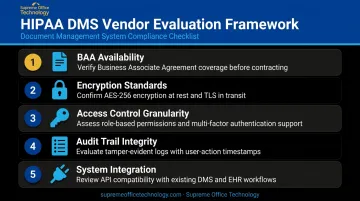
Assess every vendor across these five dimensions:
- BAA availability — If the vendor won't sign a BAA, using their platform for PHI is automatically a HIPAA violation, regardless of security features. Per HHS cloud guidance, this applies even when the vendor stores only encrypted data without holding the decryption key.
- Encryption standards — Look for AES-256 at rest and TLS in transit as the baseline
- Access control granularity — Role-based permissions should allow you to restrict access at the user, department, folder, and document level
- Audit trail integrity — Logs must be immutable and capture who accessed what, when, and what action was taken
- Integration with existing systems — A DMS that doesn't connect to your EHR, practice management software, or scanning hardware introduces new friction rather than removing it
Matching Platform to Organizational Need
Once you've completed the five-dimension assessment, use this as a quick reference to match your top priority to the right platform:
| If your priority is... | Consider... |
|---|---|
| Enterprise-scale archiving with ML indexing | DocuWare |
| Secure cross-team cloud collaboration | Box for Healthcare |
| Intelligent auto-classification of large document libraries | M-Files |
| Patient-facing portals and e-signature workflows | SmartVault |
| Paperless patient intake and consent management | DocuSign for Healthcare |
Supreme Office Technology has worked with Connecticut healthcare and regulated-industry organizations since 1982, helping them assess, select, and deploy document management solutions that meet HIPAA requirements. Their portfolio includes healthcare-specific tools such as Dispatcher Phoenix Rx Shield for automated document routing and eGoldFax for Healthcare for secure fax transmission — both integrated within a broader DMS implementation approach.
Conclusion
Choosing a HIPAA-compliant document management system carries real legal and operational weight. A breach or audit failure isn't just an IT problem — it directly affects patient trust and your organization's liability. The right platform needs to match your document volume, workflow complexity, staff capabilities, and scalability requirements, not just the features a vendor leads with in its pitch.
Before committing to any solution, look beyond the surface-level "HIPAA compliant" label. Confirm the vendor will sign a BAA. Verify encryption standards. Test the granularity of access controls. Review what the audit logs actually capture and how long they're retained.
Connecticut healthcare organizations and regulated businesses looking for a structured, no-pressure starting point can reach out to Supreme Office Technology for a no-obligation document management assessment. Serving Connecticut since 1982, their team works with healthcare and regulated businesses across New Haven, Waterbury, and Middletown to match the right document management solution to your actual compliance requirements — not just a vendor checklist.
Frequently Asked Questions
What's the best HIPAA compliance tool?
The right choice depends on your organization's size, document volume, and existing systems. Any strong HIPAA compliance tool must offer encryption, role-based access controls, immutable audit trails, and a signed BAA with your vendor.
What makes a document HIPAA compliant?
A HIPAA-compliant document stores PHI with encryption, limits access through role-based controls, and tracks every interaction in audit logs. The full document lifecycle — creation, storage, sharing, and destruction — must meet HIPAA's technical and administrative safeguard requirements.
What are the 5 main HIPAA rules?
The five key rules are the Privacy Rule, Security Rule, Breach Notification Rule, Enforcement Rule, and Omnibus Rule. For document management, the Security Rule and Privacy Rule are most directly applicable.
What is a Business Associate Agreement (BAA) and why does it matter?
A BAA is a legally required contract between a covered entity and any vendor that handles PHI on its behalf. Without a signed BAA, using that vendor's platform for PHI constitutes a HIPAA violation on its own — regardless of how secure the software is.
Can standard Google Drive or Dropbox be used for PHI?
Consumer versions cannot. Business-tier versions — Google Workspace and qualifying Dropbox team plans — can be configured for HIPAA compliance, but only when a BAA is signed and security settings are properly configured before any PHI is stored.
How long must healthcare documents be retained under HIPAA?
HIPAA requires compliance documentation — policies, training records, and BAAs — to be retained for a minimum of six years. Patient medical records are governed by state law, which typically mandates five to ten years.