According to IBM's 2025 Cost of a Data Breach Report, the average healthcare data breach now costs $7.42 million — the highest of any industry, for the 14th consecutive year. Physical documents are not exempt: paper and film records accounted for 5.6% of 2025 healthcare data breaches, according to the HIPAA Journal's 2025 Healthcare Data Breach Report.
This guide covers what HIPAA-compliant print and mail actually requires, who must comply, what safeguards apply at each stage, how to secure the printers already in your office, and what to look for when evaluating an outside vendor.
Key Takeaways
- Every stage — from data transfer to postal handoff — requires administrative, physical, and technical safeguards.
- PHI must never be visible through window envelopes or on the outside of a mailer.
- Any vendor that processes PHI is a Business Associate and must sign a BAA before work begins.
- In-office MFPs require encrypted storage, secure print release, and audit logging to remain compliant.
- Vendor compliance verification requires checking certifications, physical security, and piece-level tracking.
What Is HIPAA-Compliant Print and Mail?
HIPAA — the Health Insurance Portability and Accountability Act, enacted on August 21, 1996 — sets the national standard for protecting patients' health information. That protection doesn't stop at digital systems — it covers every physical document a healthcare organization produces and sends, including items many teams overlook.
HIPAA-compliant print and mail means every step of creating and delivering a document containing Protected Health Information (PHI) must follow three core rules:
- Privacy Rule (45 CFR Part 164, Subpart E) — governs how PHI may be used and disclosed
- Security Rule (45 CFR Part 164, Subpart C) — protects electronic PHI, including data stored on printer hard drives and transferred to vendors
- Breach Notification Rule (45 CFR Part 164, Subpart D) — sets requirements if PHI is improperly disclosed
The documents in scope are broader than most organizations expect. Patient billing statements, explanation of benefits (EOBs), health insurance cards, appointment reminders, lab results, and breach notification letters all qualify — as does any correspondence linking a patient's name to health, treatment, or payment information. Mishandling any of these carries the same regulatory exposure as a data breach.
What PHI Looks Like in Print and Mail
The 18 Identifiers
Under 45 CFR 164.514(b)(2), PHI includes any individually identifiable health information tied to one or more of 18 identifiers. Those most commonly appearing in mailed documents include:
- Full name and address
- Dates of birth, service, or admission
- Phone and fax numbers
- Email addresses
- Social Security numbers
- Medical record numbers and health plan beneficiary numbers
- Account numbers and certificate/license numbers
- Diagnosis codes and prescription details
- Any unique identifying code or characteristic
Even ZIP codes require care — regulations permit only the first three digits, and only when the geographic area represented contains more than 20,000 people.
The Mailing Exterior Rule
The Aetna case illustrates what improper mailing exposure looks like in practice. According to a HIPAA Journal report, Aetna used oversized window envelopes that made patient names, addresses, and the words "HIV Medications" visible for approximately 12,000 individuals. A separate mailing exposed information suggesting atrial fibrillation for 1,600 more. The result: state attorney general settlements and significant financial consequences.
HHS requires covered entities to implement reasonable safeguards to prevent incidental disclosures. That means PHI-bearing content must be fully enclosed in opaque envelopes — not exposed through window panels or printed on postcard exteriors.
Every Stage Is an Exposure Point
The lifecycle of a PHI document has multiple points where a compliance failure can occur:
- Receiving the data file from the covered entity
- Processing and queuing for print production
- Actual print output
- Folding, inserting, and sealing
- Pre-sort and bundling
- USPS handoff
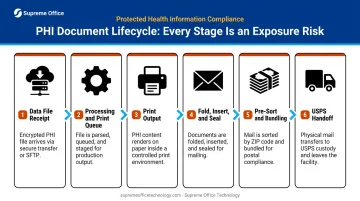
Each of these stages requires documented controls, not just the final envelope.
Who Must Comply: Covered Entities and Business Associates
Covered Entities
Under 45 CFR 160.103, covered entities are:
- Healthcare providers who transmit health information electronically in connection with covered transactions (hospitals, clinics, private practices)
- Health plans and insurance companies
- Healthcare clearinghouses
These organizations bear primary legal responsibility for ensuring all PHI communications are handled compliantly, whether they handle printing internally or outsource it.
Business Associates and the BAA Requirement
Any third-party vendor that creates, receives, maintains, or transmits PHI on behalf of a covered entity is a Business Associate under HIPAA, and must sign a Business Associate Agreement (BAA) before handling any PHI. This applies to:
- Commercial printers and mail houses
- Document management companies
- Any vendor that processes, addresses, or inserts PHI-bearing documents
USPS, FedEx, and UPS are explicitly exempt. HHS FAQ 245 confirms that carriers acting only as conduits for transport (without accessing or storing PHI) do not require BAAs. A print vendor that opens, reads, or processes PHI is not a conduit; a carrier moving sealed envelopes generally is.
That distinction matters when selecting any vendor in your print and mail workflow. Every party that touches PHI before it reaches the carrier must have a signed BAA on file.
Core Requirements for HIPAA-Compliant Printing and Mailing
Three categories of safeguards apply to print and mail operations. Compliance requires all three.
Administrative Safeguards (45 CFR 164.308)
Administrative safeguards are the documented policies and processes that govern how PHI is handled:
- Designate a HIPAA Security Officer responsible for print workflow compliance
- Maintain written PHI handling policies covering every step of print production
- Conduct regular risk assessments to identify gaps before they become violations
- Train all staff who touch PHI in the production process, at minimum annually
The BAA with any print vendor must specify: what PHI the vendor will access, how it will be protected, what happens in a breach, and how PHI will be destroyed when the engagement ends. No PHI should transfer to a vendor without a signed BAA on file.
Physical Safeguards (45 CFR 164.310)
Physical controls go beyond locked doors — they govern how PHI documents move through every stage of production:
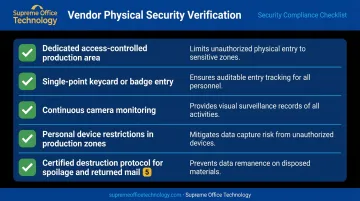
- Controlled single-point access to production areas — keycard entry, security cameras, visitor logs
- Restrictions on personal devices in areas where PHI documents are produced
- Secure movement of printed materials through the facility — closed carts, no open stacking of PHI documents
- Certified destruction of misprints, paper jams, and returned mail — cross-cut shredding at minimum
One frequently overlooked risk: PHI-bearing documents left in printer output trays or on open desks. That constitutes an incidental disclosure, and it's among the most common compliance failures in healthcare settings.
Technical Safeguards (45 CFR 164.312)
Technical controls cover data security at every electronic touchpoint:
- Encrypted data transmission — 45 CFR 164.312(e)(1) requires technical measures to guard against unauthorized access to ePHI over electronic networks; encryption under 164.312(e)(2)(ii) is an addressable specification implement it for PHI file transfers
- Encryption of PHI at rest — on servers and device hard drives
- Role-based access controls — limiting who can access PHI data electronically
- Audit logs — capturing every access and action taken on PHI files
- Certified hard drive wiping — required when servers or devices are retired or returned
Intelligent insertion technology provides a specific protection for mail production: 2D barcodes on each document are matched by camera systems during insertion, confirming that the correct documents reach the correct envelope. Any mismatch halts the line immediately, preventing the serious HIPAA violation of mailing one patient's PHI to another patient's address.
Making Your In-House Printers HIPAA-Compliant
Most healthcare offices focus compliance attention on their print vendors and overlook the devices already on their networks. That's a documented risk.
In 2013, HHS OCR settled with Affinity Health Plan for $1,215,780 after the organization returned leased photocopiers without erasing the hard drives — which contained ePHI from years of document processing. The devices went back to the vendor with patient data still on them.
What to Require on Any In-Office MFP
Modern multifunction printers store document images on internal hard drives, maintain print job logs, and connect to networks. Key security features every healthcare MFP should have enabled and maintained:
- Encrypted hard drive storage — data at rest on the device must be protected
- Automatic data overwrite — hard drive data wiped after each job
- Secure print release — users must authenticate at the device before a document prints; nothing sits unattended in an output tray
- Role-based user permissions — staff access only the functions their role requires
- Audit logging — every print, scan, copy, and fax action recorded
- Network security settings — including encrypted data transmission
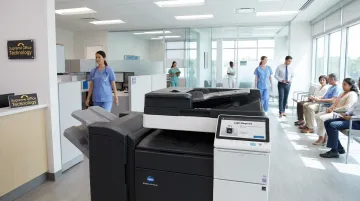
Connecticut healthcare organizations sourcing equipment through Supreme Office Technology can find these controls built into the Konica Minolta bizhub i-Series lineup, which includes the C451i, C551i, C651i, and C751i. The i-Series firmware has earned Keypoint Intelligence's Security Validation Seal for Device Penetration — independent third-party confirmation that the platform's security controls hold up under testing.
Device Retirement and Disposal
The security requirements don't end when a device leaves your office. Before returning a leased MFP or disposing of any printer that has processed PHI, the hard drive must be wiped or physically destroyed using a certified method. This step must be documented — it is a compliance requirement. Healthcare organizations should confirm with their equipment provider what data destruction documentation they receive at end of lease.
How to Choose a HIPAA-Compliant Print and Mail Vendor
Vendor selection is where compliance gaps most commonly appear. Here is what to verify before any PHI changes hands:
Certifications to Request
- HIPAA compliance documentation — current, verifiable, not just a self-attestation
- HITRUST CSF certification — the HITRUST framework harmonizes 70+ standards and regulations, providing assessed controls that support HIPAA compliance efforts; it is evidence of a mature security program
- SOC 2 Type II report from an independent CPA — review the period covered, the trust service criteria tested, and any noted control exceptions
Request copies of all certifications and check expiration dates. A certification that lapsed six months ago offers no current assurance.
Data Security Practices
Confirm the following before transferring any PHI:
- PHI files accepted only via encrypted transfer protocols — not standard email
- Data encrypted in transit and at rest
- Role-restricted, logged access to PHI
- Regular penetration testing and vulnerability scans
Physical Security at Their Facility
Ask directly:
- Is the production area a dedicated, access-controlled space?
- Single-point entry with keycard or badge?
- Continuous camera monitoring?
- Restrictions on employee personal devices in production areas?
- Certified destruction protocol for spoilage and returned mail?
Piece-Level Tracking
A compliant vendor should be able to document that every piece in a job was correctly assembled and delivered. Ask:
- How is a document mismatch detected and handled mid-job?
- How are jams during insertion documented?
- Is there a real-time tracking portal or daily job confirmation report?
The ability to produce this documentation is a strong indicator of mature compliance infrastructure, not a nice-to-have feature.
The BAA Before Any Work Begins
Per 45 CFR 164.504(e), the BAA must clearly define the vendor's responsibilities, breach notification timelines, and PHI disposal procedures at contract end. On breach notification specifically: business associates must notify covered entities within 60 days of discovery under 45 CFR 164.410(b). Review the BAA carefully. It is a legal document, not a formality.
Frequently Asked Questions
Is postal mail HIPAA compliant?
USPS, FedEx, and UPS are explicitly exempt from HIPAA's Business Associate requirements because they act only as transport conduits without accessing or storing PHI. However, the covered entity or their print vendor is responsible for ensuring PHI is properly enclosed and protected before it enters the mail stream.
Are printers HIPAA compliant?
Printers and MFPs are not inherently HIPAA compliant — compliance depends entirely on how they are configured and maintained. Secure print release, encrypted storage, user authentication, and audit logging must be actively enabled; devices without these controls present a real PHI exposure risk.
What types of documents require HIPAA-compliant printing and mailing?
Any document pairing a patient's name with health, treatment, or payment information falls under HIPAA's print and mail requirements. This includes billing statements, EOBs, insurance ID cards, appointment reminders, lab results, and breach notification letters.
What is a Business Associate Agreement and when is it required for printing?
A BAA is a legally required contract between a covered entity and any vendor that handles PHI on their behalf. A print or mail vendor that receives, processes, or stores PHI must have a signed BAA in place before any PHI is transferred to them — no exceptions.
What are the penalties for HIPAA violations related to print and mail?
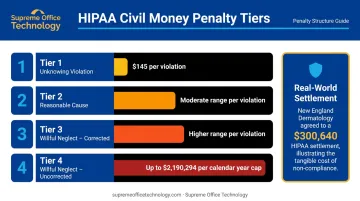
HIPAA civil money penalties are tiered by culpability. Per the 2026 Federal Register inflation adjustment, fines range from $145 per violation for unknowing violations up to $2,190,294 per calendar year for willful neglect left uncorrected. In 2022, HHS OCR levied a $300,640 settlement against New England Dermatology after patient labels were discarded in an open dumpster — the same category of physical-document failure that print and mail gaps can trigger.
How do I verify that my print and mail vendor is truly HIPAA compliant?
Request copies of current certifications, ask for the signed BAA before any work begins, ask for results from their most recent third-party compliance audit, and confirm they have a designated compliance officer. Documentation is what counts — not verbal assurances.