The problem is that unmanaged printing is one of the most quietly expensive operational issues in K-12. It creates IT bottlenecks, compliance exposure, and budget overruns that rarely get traced back to their source. According to Gartner, printing can consume 1% to 3% of an organization's annual spend — and active print management can cut that recurring cost by 10% to 30%.
This guide covers 10 essential print solutions — spanning hardware, software, and managed services — that K-12 schools and districts should have in place heading into 2026.
Key Takeaways
- Unmanaged printing quietly drains school budgets through wasted supplies, IT time, and unclaimed print jobs.
- The 10 solutions below span hardware, software, and managed services — covering every layer of a school's print environment.
- FERPA's physical record-handling rules make authenticated printing a compliance requirement, not an optional feature.
- A local provider delivers faster response times and more predictable costs than a national reseller.
- Start with a print environment assessment — not a device purchase.
Why Schools Can't Afford to Ignore Print Management in 2026
Despite the shift toward digital classrooms, physical printing remains embedded in K-12 operations. Instructional materials, administrative records, compliance documentation, and parent communications all depend on it. A well-managed print environment is operational infrastructure — schools that treat it as an afterthought pay for that decision in wasted budget.
The numbers make the case directly. Gartner's research puts printing at 1% to 3% of annual organizational spend, with active management delivering savings of 10% to 30%. For a school district running on a constrained budget, that gap between managed and unmanaged print represents real dollars that could flow back into instruction.
The 10 solutions below address the most common school print challenges: cost control, security, efficiency, and sustainability. Getting the right mix in place is how schools stop treating printing as a fixed, invisible expense and start managing it as a measurable line item.
Top 10 Print Solutions Every School Needs in 2026
These solutions were selected based on their direct impact on cost reduction, security, operational efficiency, and scalability for K-12 environments.
1. High-Volume Multifunction Printers (MFPs)
MFPs consolidate printing, copying, scanning, and faxing into a single device. That matters because clusters of single-function printers drive up supply costs, increase maintenance demands, and create IT complexity that nobody budgeted for.
Modern high-duty-cycle MFPs are faster, more energy-efficient, and built with security features that single-function devices simply don't offer. When evaluating MFPs for school environments, look for:
- Duplex printing as standard (not an add-on)
- Cloud connectivity for Chromebook and tablet support
- Robust authentication options (PIN, badge, biometric)
- ENERGY STAR certification — certified imaging equipment saves up to 35% versus conventional models
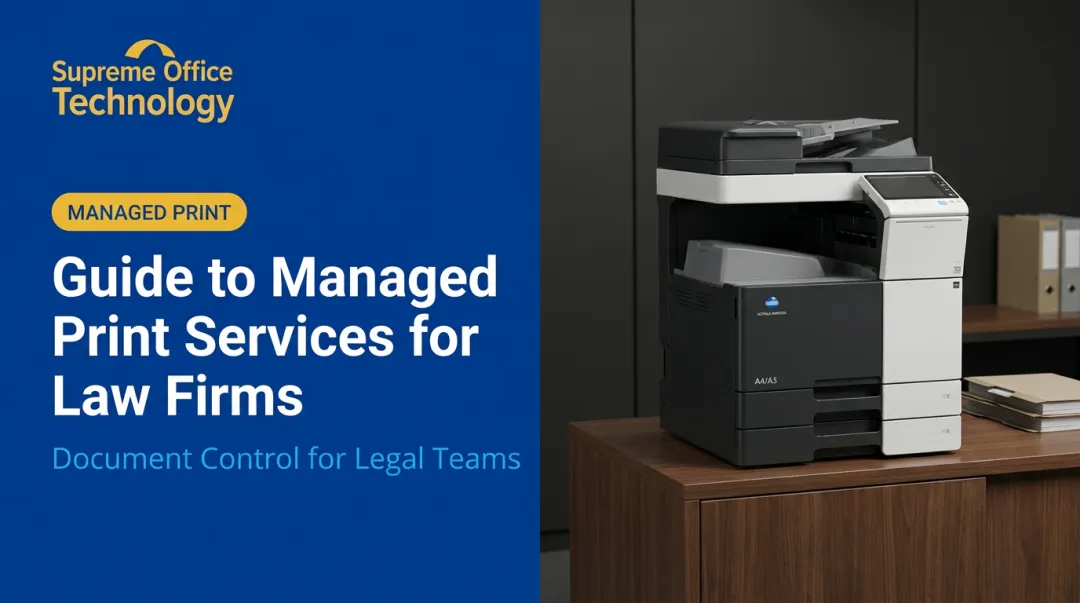
Konica Minolta's bizhub line — including the C451i, C551i, C651i, and C751i — earned 2025 BLI Pick Awards from Keypoint Intelligence. Konica Minolta's bizhub line — including the C451i, C551i, C651i, and C751i — earned 2025 BLI Pick Awards from Keypoint Intelligence, recognized for productivity, security, image quality, and above-average scan speeds. The line also took 2025 A3 Line of the Year honors. Supreme Office Technology is an authorized Konica Minolta dealer serving Connecticut schools.
2. Managed Print Services (MPS)
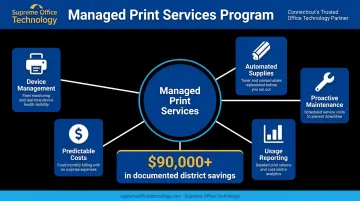
MPS replaces the patchwork of vendor relationships most schools piece together — separate contracts for devices, toner, maintenance, and IT support — with a single, managed program covering all of it.
What that typically includes:
- Device placement and configuration
- Automated supplies management
- Proactive maintenance and repair
- Usage monitoring and reporting
- Predictable monthly costs
Hatboro-Horsham School District, working with a managed print provider, achieved $90,000 in cumulative cost savings and reallocated one IT staff member to higher-value work — a direct result of automated toner replenishment and optimized device placement.
Supreme Office Technology has implemented managed print programs for school districts — including documented K-12 deployments through its Konica Minolta partnership — structured to align with education budgets and provide local service support.
3. Cloud and Mobile Printing
Chromebooks dominate K-12 computing environments. Windows-dependent print drivers create real friction for teachers and IT teams when the majority of student devices don't support them natively.
Cloud printing solves this by allowing print jobs from any device — Chromebook, tablet, laptop — to reach any enabled printer on the network, without driver installations or location-locked printing.
Key requirements when evaluating cloud print solutions:
- ChromeOS admin console compatibility (CUPS/IPP-based, not legacy Google Cloud Print, which was retired in 2020)
- Microsoft Universal Print support for districts on Microsoft 365 Education A3/A5
- Role-based access controls integrated with Google Workspace for Education or Microsoft 365
- Student data privacy review — CoSN identifies cybersecurity as the top priority for K-12 technology leaders
4. Secure Print Release / Authenticated Printing
Secure print release holds documents in a queue until the authorized user authenticates at the device — via PIN, ID badge, or biometric — before anything prints. Nothing sits unclaimed on an output tray.
This matters directly for FERPA compliance. The U.S. Department of Education requires schools to maintain physical security of education records and limit access to those with legitimate educational interest. Printed student records left on shared output trays are a straightforward exposure point.
Key risk indicators that make authenticated printing worth prioritizing:
- In 2019, Oshkosh Elementary student records were found in a dumpster — physical document handling carries real consequences
- Quocirca's 2025 Print Security Landscape report found 56% of organizations experienced at least one print-related data loss in the previous year
- Authenticated printing directly eliminates the unclaimed-job risk vector
5. Print Management Software
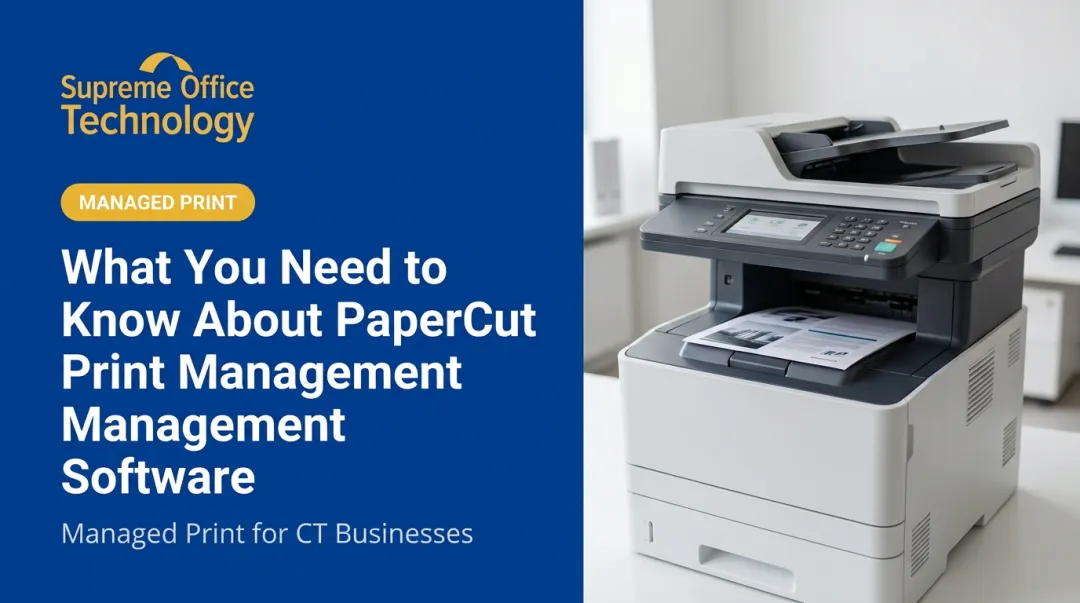
Print management platforms — PaperCut MF and Canon uniFLOW are the most common in K-12 — give administrators detailed insight into exactly who is printing, how much, on which device, and at what cost.
Core capabilities relevant to schools:
- Print quotas by user, student group, or department — with automatic blocking when limits are reached
- Usage reporting at the device, user, and department level
- Follow-me / Find-Me printing — jobs follow the user to the nearest available printer, reducing wasted output
- Policy enforcement — automatically defaulting to duplex, restricting color printing, blocking certain job types
- Mobile and BYOD support — web print, email-to-print, and mobile release options
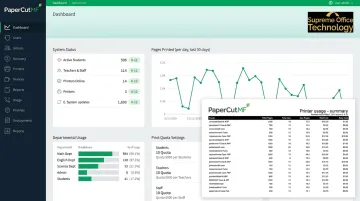
Supreme Office Technology is a PaperCut partner and deploys PaperCut MF as its flagship print management solution for K-12 clients. Equitrac Express — marketed specifically for educational organizations — is also available for districts with different workflow requirements.
6. Wide Format / Large Format Printing
Every school regularly needs banners, event posters, classroom displays, science fair graphics, and hallway signage. Outsourcing those jobs to a commercial print shop means lead times, markup, and a recurring line item that adds up quickly.
An in-house wide format printer cuts all three of those costs — on the school's schedule, not a vendor's.
When evaluating wide format devices, schools should consider:
- Media compatibility — can it handle bond paper, vinyl, canvas, and banner material?
- Ink type — aqueous inks work well for indoor materials; latex offers better durability for outdoor signage and events
- Print speed — especially for schools producing large quantities around event seasons
- Indoor vs. outdoor durability — match ink and substrate to end use
Supreme Office Technology carries wide format devices from KIP and Epson, with installation, training, and maintenance available under managed service agreements for school clients.
7. Automated Supply Management
Running out of toner mid-semester isn't just inconvenient — it disrupts instruction and creates emergency purchasing situations that cost more than planned supply orders. Automated replenishment solves this by having devices communicate low-supply alerts directly to the provider, triggering shipment before a shortage occurs. Running out of toner mid-semester isn't just inconvenient — it disrupts instruction and creates emergency purchasing situations that cost more than planned supply orders.
Automated replenishment solves this by having devices communicate low-supply alerts directly to the provider, triggering shipment before a shortage occurs. No stockpiling. No emergency orders. No scrambling.
This feature is built into most managed print service contracts. The Hatboro-Horsham case study puts it in concrete terms: auto toner replenishment alone freed an IT staff member from supply-management tasks entirely — time redirected to higher-priority work.
8. Usage Analytics and Reporting
Analytics make every other print solution more effective. Without visibility into who is printing what, administrators can't set meaningful quotas, identify problem areas, or benchmark improvement.
What good print analytics enables:
- Identifying departments or grade levels generating disproportionate print costs
- Setting realistic quotas backed by actual usage data
- Benchmarking cost-per-page trends over time
- Supporting budget planning with documented print spend
- Demonstrating compliance with print policy enforcement
PaperCut's analytics dashboard provides device-level, user-level, and department-level reporting — including environmental impact tracking — giving administrators a documented view of exactly where print spend goes. That turns budget conversations from estimates into evidence.
9. Eco-Friendly and Sustainable Printing Practices
Sustainability goals are showing up in district strategic plans and state education policy with increasing frequency. Most of the meaningful sustainability gains in print come from policy changes, not equipment overhauls.
Practical actions with documented impact:
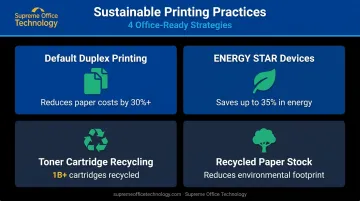
- Default duplex printing — Gartner estimates this alone can reduce annual paper costs by at least 30%; a GSA study found federal employees were only printing duplex 46% of the time before intervention
- ENERGY STAR-certified devices — saves up to 35% in energy versus conventional models
- Toner cartridge recycling programs — HP Planet Partners has recycled over 1 billion cartridges; most major manufacturers offer similar programs
- Recycled paper stocks where budget allows
For Connecticut schools, the CT Green LEAF Schools initiative provides a statewide framework for documenting eco-friendly practices — and aligning print operations with those goals can support grant eligibility and institutional reporting.
10. Automated Document Workflow Solutions
Document workflow automation connects printing and scanning to digital routing and archiving — reducing the manual handling that slows administrative processes like enrollment, HR onboarding, and records management.
In practice, a scanned paper form can be automatically routed to the correct staff member or system, converted to a searchable digital file, and archived — without anyone manually moving it between folders.
Supreme Office Technology offers this capability through Dispatcher Phoenix — Konica Minolta's workflow automation platform — and ECM solutions that include:
- Document digitization with OCR
- Rules-based routing workflows
- Cloud storage integration (SharePoint, OneDrive, Google Drive)
- Centralized digital archiving with keyword search
While direct SIS integration varies by platform, these tools create a working bridge between the physical document environment and the digital systems schools already use — reducing errors, improving compliance documentation, and freeing administrative staff from repetitive handling tasks.
How to Choose the Right Print Solutions for Your School
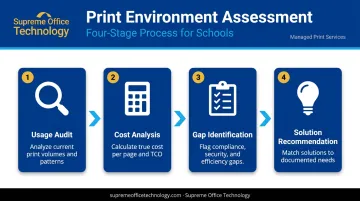
The most common mistake schools make is starting with a specific device or software in mind rather than starting with the data.
A print environment assessment — conducted before any purchasing decision — identifies actual usage patterns, device performance, cost per page, and workflow bottlenecks. That baseline makes every subsequent decision defensible.
Key evaluation criteria:
- Total cost of ownership, not just sticker price or lease rate
- Scalability across buildings, grade levels, and enrollment changes
- FERPA compliance depth — authentication, access controls, and audit trails
- Integration with Google Workspace, Microsoft 365, and your SIS platform
- Local vendor presence — someone who can be on-site in 20 minutes, not just ship a part
Local support is where procurement decisions quietly succeed or fail. A national reseller can ship replacement parts overnight, but they can't walk your building, know your devices, or sit across from your IT coordinator when something goes wrong. A nearby provider with direct account familiarity makes a real difference in uptime and response time — not just at installation, but through the life of the contract.
Supreme Office Technology has served Connecticut institutions for over 40 years and offers a no-obligation print assessment as the starting point for any school engagement. Reach them at (203) 239-6511, info@supremeofficetechnology.com, or through the assessment request form at supremeofficetechnology.com.
Frequently Asked Questions
What are managed print solutions for schools?
Managed print solutions bundle device management, supplies, maintenance, and usage reporting under a single provider, eliminating separate vendor relationships for every printer-related need and replacing them with predictable costs and reduced burden on IT staff.
How much do managed print solutions for schools cost?
Pricing is typically structured as a cost-per-page rate or a flat monthly fee depending on volume and device count. Because every district's environment differs, a print assessment is the most reliable way to establish an accurate baseline. Most schools see net cost reduction after switching.
Are managed print solutions for schools worth it?
For budget-constrained environments, yes. Gartner's research shows active print management can reduce recurring document-output spend by 10% to 30% — through eliminating waste, reducing IT burden, and replacing unpredictable expenses with fixed monthly costs.
What printing software is used with managed print solutions for schools?
PaperCut MF and Canon uniFLOW are the most common platforms in K-12 environments. Both enable usage tracking, print quotas, secure release, and reporting — and integrate with school identity and device management systems including Google Workspace and Microsoft 365.
What is the difference between managed print services and leasing a printer?
Leasing covers hardware acquisition and possibly basic maintenance. Managed print services also include proactive monitoring, automated supplies, usage reporting, security management, and strategic recommendations. MPS is an operational partnership; leasing is a financing arrangement.
How do schools ensure FERPA compliance when it comes to printing?
Authenticated print release (PIN, badge, or biometric) prevents student records from sitting unsecured on output trays. Print management software that logs user activity and restricts access by role supports FERPA documentation requirements — and NCES guidance specifically requires physical security for paper records when not in use.