According to PaperCut, up to 20% of print jobs are never collected — meaning a significant chunk of every toner cartridge and ream of paper your business buys produces nothing useful. For Connecticut businesses managing multiple devices across departments, that waste adds up fast.
PaperCut MF addresses exactly this problem. This guide covers what it is, how it works, which features matter most, who benefits, and how to choose the right version for your organization.
Key Takeaways
- PaperCut MF tracks every print, copy, scan, and fax job from a centralized dashboard
- Secure print release prevents confidential documents from sitting unattended on output trays
- Print quotas and policy enforcement reduce waste automatically, without manual intervention
- Works with most major printer and copier brands, typically requiring no new hardware
- Scales from small offices to large enterprises with hundreds of devices
What Is PaperCut MF Software?
PaperCut MF is a print management platform developed by PaperCut Software International that monitors, controls, and optimizes how an organization uses its printers and multifunction devices. It covers print, copy, scan, and fax activity from one centralized dashboard.
The "MF" stands for Multifunction. That distinction matters. Unlike basic print tracking tools, PaperCut MF integrates at the hardware level with multifunction devices — giving administrators control over all device functions, not just printing.
That embedded integration enables secure authentication at the machine, device-level policy enforcement, and full audit trails for every function a copier performs.
Who It's Built For
PaperCut MF scales from small offices with a handful of devices to large enterprises managing hundreds. It's compatible with virtually all major brands, including Konica Minolta, Canon, HP, Ricoh, Kyocera, Xerox, Lexmark, Sharp, Toshiba, and more.
For most Connecticut businesses already leasing or owning multifunction devices, PaperCut MF can be deployed on existing hardware — no new equipment purchase required.
Most organizations can't tell you what they spend on printing, who's driving that spend, or where the waste is coming from. PaperCut solves that — making every print job traceable, accountable, and manageable.
Key Features of PaperCut MF
Secure Print Release
Print jobs are held in a queue and only released when the authorized user authenticates at the device — via PIN, ID card swipe, or mobile app. Documents never sit unattended on an output tray waiting to be picked up (or picked up by the wrong person).
This matters especially for organizations handling regulated information. PaperCut's healthcare-focused content ties secure release and job-by-job audit logs to HIPAA-relevant document protection — supporting the kinds of safeguards that healthcare organizations, legal firms, and financial institutions need to demonstrate. It doesn't certify compliance on its own, but it puts the right controls in place.
Print Tracking and Reporting
PaperCut MF tracks every job in real time:
- Who printed it and on which device
- How many pages, in color or grayscale
- Cost per job, assigned to a user, department, or cost center
- Reports can run on-demand or on a scheduled basis (daily, weekly, monthly)
This data changes how organizations make decisions — about fleet size, lease negotiations, policy adjustments, and where the real budget pressure is coming from.
Print Quotas and Policy Enforcement
Administrators can set print budgets by user or group, with configurable alerts or hard limits when quotas are reached. But the more powerful feature is automated policy enforcement running in the background without administrator involvement:
- Convert single-sided jobs to duplex automatically
- Default color jobs to grayscale
- Prompt users before large print runs proceed
- Reset quota balances daily, weekly, monthly, or annually
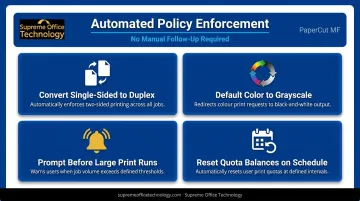
Once configured, the rules enforce themselves — no manual follow-up needed.
Mobile and Cloud Printing
PaperCut Mobility Print lets employees print from smartphones, tablets, laptops, and Chromebooks without complex setup — supporting iOS, Windows, macOS, Android, and Chrome devices. For organizations managing hybrid workforces where employees print from multiple locations, this simplifies BYOD printing across the board.
Cost Allocation and Charge-Back
Print costs can be assigned to specific users, departments, projects, or client accounts. For legal firms tracking billable matter costs, schools allocating by department, or any organization that needs to know which cost center is driving print spend — this feature turns the print environment into an accountable, reportable function.
How PaperCut MF Works
PaperCut MF installs on a server — on-premise or cloud-hosted — and connects to every printer and copier on your network. It intercepts each print job before it reaches the device, checking page count, color usage, paper size, and policy compliance before releasing it.
PaperCut connects to Active Directory or LDAP automatically, so administrators don't maintain separate user lists. Employees are recognized by their existing network credentials without additional setup.
For Connecticut businesses already working with Konica Minolta multifunction devices — such as the bizhub C451i, C551i, or other models in the i-Series line — PaperCut MF can be layered onto that existing infrastructure. The software runs across Windows, Mac, Linux, and mixed-fleet environments, and supports:
- Locally hosted deployment on your own print server
- Multi-site environments
- Environments with no print server
- Combinations of all three
Supreme Office Technology, an authorized dealer serving New Haven, Waterbury, Middletown, and surrounding areas, can handle configuration on existing device fleets — including policy setup, authentication configuration, and directory integration — as part of deployment.
Business Benefits of Using PaperCut MF
Cost Reduction
Most organizations underestimate print spend until they have actual visibility into it. Once they do, the opportunities become obvious. PaperCut reports that many educational customers reduced printing costs by up to 75% through charging and quotas — and the mechanisms driving that savings (uncollected jobs, excessive color, single-sided output) exist in virtually every organization.
Document Security
Secure print release, role-based access controls, and full audit logs reduce the risk of confidential information reaching the wrong hands. For environments handling sensitive materials such as patient records or legal documents, held-job queues combined with complete activity logs directly reduce that exposure.
Sustainability
PaperCut translates paper and toner consumption into environmental metrics — trees saved, CO₂ reduced — that support sustainability reporting. Duplex defaults and grayscale policies drive down consumption without requiring behavioral change from individual employees.
Operational Efficiency
Centralizing printer management eliminates per-workstation manual IT configuration and reduces printing disruptions across the organization. IT teams get proactive alerts on device issues rather than reactive support calls — freeing time for higher-value work.
Informed Decision-Making
The reporting PaperCut generates — broken down by user, device, department, and cost center — gives leadership real data for printer fleet decisions, lease negotiations, and policy adjustments. These aren't estimates. They're actual job logs.
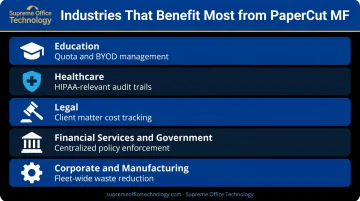
Which Industries Benefit Most from PaperCut?
PaperCut is built to handle the complexity of shared print environments — making it a natural fit across several industries. Here's where it tends to deliver the most value.
Education — Schools, colleges, and universities use PaperCut to set student and staff print quotas, allocate costs by department, and manage distributed fleets across buildings or campuses. Quota balances can reset on any schedule, and BYOD printing support keeps it practical for modern learning environments.
Healthcare — Secure print release and audit trails directly address HIPAA-relevant safeguards. PaperCut logs who prints what, when, and on which device — giving healthcare organizations verifiable records for compliance audits.
Legal — Law firms use PaperCut's shared accounts and cost allocation features to track print costs by client matter, supporting billing accuracy and client confidentiality. Supreme Office Technology serves legal clients across Connecticut, including firms that need this kind of precise print accountability.
Financial Services and Government — Organizations managing shared devices across departments or branch locations benefit from PaperCut's cost accountability, centralized control, and consistent policy enforcement — regardless of which office or floor a job originates from.
Corporate and Manufacturing — Multi-department organizations with shared printers gain the same quota enforcement, job routing, and centralized visibility that regulated industries depend on — with measurable reductions in print waste and per-page costs.
PaperCut MF vs. Other PaperCut Versions
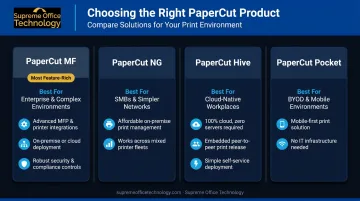
Choosing the right product matters. Here's how the lineup breaks down:
| Product | Best For | Key Distinction |
|---|---|---|
| PaperCut MF | Organizations with multifunction devices, compliance needs, or complex multi-department environments | Full embedded MFD integration — controls print, copy, scan, fax, and enables secure release at the machine |
| PaperCut NG | Simpler environments with standard printers only | Print tracking without embedded device functionality |
| PaperCut Hive | Cloud-first organizations that want to eliminate print servers | Cloud-native, server-free deployment; can integrate with MFD firmware |
| PaperCut Pocket | Small businesses wanting lightweight cloud print management | Self-setup, subscription-based, mobile QR/NFC release |
If your organization uses multifunction copiers, operates in a regulated industry, or manages printing across multiple departments or locations, PaperCut MF is the right evaluation target. Smaller businesses with simpler, single-function environments may find Hive or Pocket sufficient.
That said, the right choice depends on your specific setup. Supreme Office Technology offers no-obligation business assessments for Connecticut organizations to help identify the best fit before any purchase decision.
Frequently Asked Questions
What is PaperCut MF software?
PaperCut MF is a print management platform that monitors and controls printing across multifunction devices. It enables organizations to track usage, enforce print policies, secure document release at the device, and allocate costs by user, department, or project — all from a centralized dashboard.
Is PaperCut software free?
PaperCut MF is not free. It's licensed based on device count, and pricing varies depending on deployment type and scale. A 40-day free trial is available, and most organizations recover the cost through reduced print waste and toner savings within the first year.
Is PaperCut MF good for large businesses?
PaperCut MF scales well to large enterprises. It handles hundreds of devices, integrates with Active Directory for automated user management, and provides department-level reporting and policy controls that distributed organizations require.
What is the difference between PaperCut MF and PaperCut NG?
PaperCut MF includes embedded functionality on multifunction devices, enabling secure authentication and print release directly at the machine. PaperCut NG is designed for simpler environments with standard printers and lacks that embedded device integration.
Does PaperCut work with existing printers and copiers?
PaperCut MF is compatible with virtually all major printer and copier brands, including Konica Minolta. In most deployments, it runs on your existing device fleet without requiring new hardware purchases.
How does secure print release protect confidential documents?
Jobs are held in a queue until the authorized user authenticates at the device via PIN, card swipe, or mobile app. Only the intended recipient can release and retrieve the output — so sensitive documents are never left sitting unattended on a shared printer tray.