Introduction
Manufacturing operations run on documents. SOPs, batch records, work instructions, engineering drawings, quality certifications — keeping that list controlled is hard. When those documents are managed manually — through shared drives, paper binders, and email chains — the consequences are predictable: rework from outdated procedures, compliance findings during audits, and workers chasing files instead of doing actual work.
The scale of the problem is significant. According to an ABB survey of 3,600 senior industry decision-makers, 83% of respondents estimate unplanned downtime costs their operations at least $10,000 per hour — with 76% citing figures above $50,000 per hour. Poor documentation practices directly feed into these losses.
This guide covers what manufacturing document automation actually involves, the specific problems it solves, the capabilities that matter most in a modern system, and how manufacturers in Connecticut can begin evaluating their options.
Key Takeaways:
- A true DMS controls documents — it doesn't just store them
- Version control failures are among the most common causes of audit non-conformances
- Knowledge workers spend 1.8 hours daily searching for information — time automation directly recovers
- ISO 9001 and FDA 21 CFR Part 11 compliance require controlled, traceable documentation
- Modern systems integrate with MFPs, ERP platforms, and production tools for end-to-end coverage
What Is Document Management in Manufacturing?
A Document Management System (DMS) in a manufacturing context is a centralized, governed system for creating, reviewing, approving, storing, and retrieving production documents. That includes SOPs, work instructions, batch records, engineering drawings, quality records, and compliance certifications.
A DMS is not a digital filing cabinet. Shared drives and paper binders store documents. A DMS controls them — and that difference is everything in a regulated production environment.
Storage vs. Control — Why the Difference Matters
| Capability | Shared Drive / Paper | Document Management System |
|---|---|---|
| Version control | Manual, error-prone | Automatic, enforced |
| Access permissions | Folder-level only | Role-based, granular |
| Approval workflows | Email or manual sign-off | Built-in, tracked |
| Audit trail | None | Tamper-evident, timestamped |
| Obsolete document handling | Relies on users | Automatic archiving |
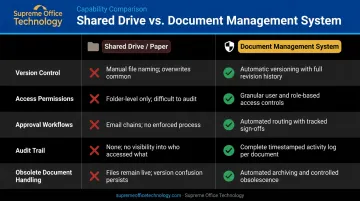
The last row is where most problems originate. When an operator pulls a procedure from a shared folder, there's no guarantee it's the current version. In a DMS, superseded versions become inaccessible automatically — only the current approved version stays in play.
Version locking, access permissions, approval chains, and audit trails are what separate a basic filing system from a compliance-ready document management infrastructure.
Common Document Management Challenges in Manufacturing
Version Control and Outdated Records
Frequently revised documents — SOPs, engineering drawings, product specs — create serious risk when managed manually. A procedure updated in engineering but not yet distributed to the shop floor means workers follow the old process. That gap produces rework, nonconformance findings, and in regulated environments, formal audit observations.
Version control failures are consistently cited among the top reasons manufacturers fail ISO 9001 audits. FDA data reinforces this point. A secondary analysis of FY 2024 Form 483 observations identifies failure to establish or follow written production and process control procedures under 21 CFR 211.100(a) as the most frequently cited drug GMP finding — a documentation control failure, not a process one.
Compliance and Audit Burden
Scattered records, inconsistent retention practices, and missing approval histories make audit preparation reactive and stressful. Manufacturers subject to:
- ISO 9001 Clause 7.5 — requiring controlled documented information throughout the quality management system
- FDA 21 CFR Part 11 — governing electronic records and signatures in regulated manufacturing
- GMP requirements — mandating written procedures and readily available records for inspection
When documentation is disorganized, even a routine audit turns into a multi-day scramble to locate records and reconstruct approval histories.
Workflow Bottlenecks and Visibility Gaps
Paper-based routing and email approvals create invisible queues. A document waiting for sign-off sits in someone's inbox without any visibility into where it is, how long it's been there, or whether it's been reviewed at all. That lack of visibility extends upward — managers have no real-time view of quality or compliance process status across departments.
McKinsey's research on knowledge worker productivity found that employees spend 1.8 hours per day (roughly 9.3 hours per week) searching for and gathering information. In a manufacturing environment, that time represents direct operational cost with no production value.
How Document Automation Transforms Manufacturing Operations
Eliminating Manual Bottlenecks with Automated Workflows
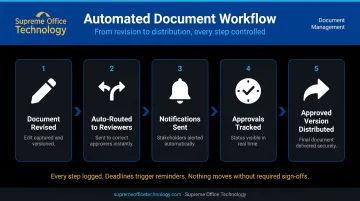
Automated document workflows remove the friction from manual routing entirely. When a document is revised, the system routes it to the appropriate reviewers, sends notifications, tracks responses, and distributes the approved version — without anyone manually managing the process.
This matters because manual handoffs fail silently. An email approval gets missed. A paper form sits on a desk. Automation makes the process visible and accountable: every step is logged, deadlines trigger reminders, and nothing moves forward without the required sign-offs.
Ensuring the Right Documents Reach the Right People
That visibility extends to distribution. Automated systems solve a problem manual processes can't reliably handle: ensuring every worker accesses only current, approved documents.
- Superseded versions become inaccessible automatically once a new version is approved
- Shop floor operators see the current SOP — not the one from six months ago
- Quality teams receive updated inspection forms the moment they're approved
- Access is role-based, so each person sees only what they need
This directly reduces human error and the compliance risk that comes from workers following obsolete procedures.
Turning Compliance into a Daily Process, Not an Event
Embedded audit trails, version histories, and automated retention schedules change how compliance works in practice. Instead of spending days reconstructing approval histories before an audit, the system has already been building that evidence continuously.
When an auditor requests records, the system surfaces complete document histories, approval chains, and access logs in seconds. Two regulatory frameworks that manufacturers frequently face:
- ISO 9001 Clause 7.5 — requires documented information to be controlled, available, and protected; a properly configured DMS makes demonstrating this straightforward
- FDA 21 CFR Part 11 — requires electronic records to be trustworthy, reliable, and equivalent to paper records; automated audit trails satisfy this by design
Centralizing Supply Chain and Quality Documentation
Compliance is only part of the picture. A centralized system also brings supplier certifications, purchase orders, vendor contracts, QC checklists, non-conformance reports (NCRs), and CAPA documentation into one searchable location. Benefits include:
- Faster supplier audits — records are retrievable in seconds, not hours
- Stronger traceability linking quality events to the specific procedures that governed them
- Consistent documentation practices across departments and facilities
- Easier identification of patterns across NCRs and corrective actions
Reclaiming Employee Time for Higher-Value Work
With McKinsey estimating that searchable knowledge records can reduce information search time by up to 35%, the productivity gains for manufacturers are real and measurable. Time previously spent locating documents, reconciling versions, and re-entering data shifts toward process improvement, problem-solving, and quality work.
Supreme Office Technology has helped Connecticut manufacturers, including Evergreen Packaging, implement document management solutions that reduce search time, tighten version control, and free up staff for higher-value work — measurable improvements that compound over time.
Critical Capabilities of an Effective Manufacturing DMS
Centralized Repository with Intelligent Search
A single, searchable repository eliminates the "where is that document?" problem. Every document type — SOPs, batch records, work instructions, engineering drawings, compliance certifications — should be:
- Tagged with metadata (document type, revision status, production area, owner)
- Retrievable by role, keyword, or category in seconds
- Accessible to the right people without requiring folder navigation
Version Control and Approval Workflows
Strict version control enforces one rule: only current, approved documents are accessible to production staff. Prior versions are automatically archived and protected from reuse.
Enforced approval workflows close the gap that paper-based systems leave open — a new version cannot go live until it has been reviewed and signed off by the designated approvers.
Role-Based Access Control and Audit Trails
Granular access controls let manufacturers define visibility precisely:
- Operators see current-version SOPs for their work area
- Quality managers see drafts, archives, and related records
- Auditors see complete version and approval histories
Every access event, edit, and approval is recorded in a tamper-evident audit trail — providing the accountability and traceability regulators require.
Integration with MFPs, ERP, and Production Systems
A DMS delivers the most value when it connects to the hardware and software manufacturers already use.
Modern multifunction printers (MFPs) serve as document capture points — scanning paper-based records and routing them directly into the DMS with metadata applied. Supreme Office Technology's Konica Minolta MFPs, paired with Dispatcher Phoenix ECM, handle exactly this workflow: capture at the device, routing to the correct repository, and integration with platforms including SharePoint, OnBase by Hyland, and cloud storage systems.
ERP and MES integration keeps production data and documentation synchronized — eliminating the disconnect between what the system records and what the floor actually does. Connecticut manufacturers evaluating this kind of connected infrastructure can use Supreme Office Technology's no-obligation office assessment to identify gaps and match the right solution to current operations.
Automated Routing and Retention Management
Tasks that typically pile up on administrators — routing documents to the correct approver, sending periodic review reminders, enforcing retention schedules — can be automated. This reduces compliance risk and frees up administrative capacity for higher-value work.
AI and Automation: Elevating Information Management
AI adds an intelligence layer on top of document management that's especially useful in high-volume manufacturing environments.
What AI-enabled systems can do:
- Automatic classification — categorizes and tags incoming documents without manual intervention, using tools like Laserfiche's Smart Fields intelligent capture
- Natural language search — workers type a question and get a direct answer from approved content — no folder navigation required (M-Files Aino and OpenText Aviator both offer this)
- Proactive compliance flags — the system identifies documents approaching review deadlines, surfaces gaps when standards are updated, or flags documents distributed without required approvals
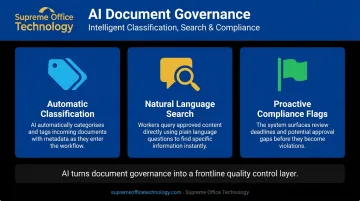
The practical result: instead of discovering a missing approval signature during an ISO audit, the system flags it the moment the document enters the workflow. Information governance stops being a cleanup task and starts working as a frontline quality control layer.
Implementation Best Practices
Start with a documentation audit. Identify every document type in play — where files live, who accesses them, and where approvals stall. Prioritize SOPs, quality records, and compliance documentation first. Full-scale migrations attempted all at once rarely finish.
Connect the system to existing tools. Integrating the DMS with your ERP and production platforms eliminates duplicate data entry and keeps documentation in sync with what's actually happening on the floor.
Build user buy-in before go-live. Workers adopt new systems faster when they understand the direct benefits: fewer audit scrambles, less rework, and less time hunting for the right revision. Tie training to those outcomes, not just system mechanics.
Measure ROI through specific KPIs:
- Reduced audit preparation time
- Faster document approval cycles
- Fewer non-conformance findings
- Reduction in time workers spend searching for documents
Tracking these metrics over 6–12 months gives a clear picture of whether the system is delivering on its promise.
Connecticut manufacturers looking to assess their current state can reach out to Supreme Office Technology for a no-obligation workflow assessment, including a dedicated Document Assessment to identify gaps and align technology to actual operations. Contact them at (203) 239-6511 or info@supremeofficetechnology.com.
Frequently Asked Questions
Is a DMS the same as an ERP system?
No — a DMS (Document Management System) manages the lifecycle of documents and information, while an ERP manages business processes like finance, inventory, and production planning. The two serve different functions but work well together: the DMS provides controlled access to the records that production and compliance processes depend on.
What is the difference between a DMS and ECM?
A DMS focuses specifically on storing, organizing, and controlling documents — version control, search, and approval workflows. ECM (Enterprise Content Management) is broader: it encompasses document management but also includes content capture, records management, workflow automation, and information governance across all content types. ECM is essentially a superset of DMS capabilities.
What are the three main types of EDMS?
The three primary types are:
- Cloud-based EDMS — hosted remotely for scalability and remote access
- On-premise EDMS — installed on your own servers for maximum control
- Hybrid EDMS — combines local control with cloud flexibility
The right choice depends on your compliance requirements, IT infrastructure, and remote access needs.
What documents should manufacturers digitize first?
Start with documents used most frequently and carrying the highest compliance risk: SOPs, work instructions, quality control checklists, batch records, and inspection reports. These are the most likely to cause audit findings or production errors when outdated or inaccessible — digitizing them first delivers the fastest return.
How does document automation support compliance audits?
Automation builds compliance evidence continuously — every approval, revision, and access event is logged with a timestamp in a tamper-evident audit trail. When an auditor requests records, the system retrieves complete version histories and approval chains in seconds, replacing days of manual preparation with a quick search.