Introduction
Many Connecticut business owners use "outsourced IT" and "managed IT services" as if they mean the same thing. They don't — and choosing the wrong model can cost you more than money.
Pick a reactive, task-based arrangement when your business needs consistent uptime, and you'll be paying for damage control instead of prevention. Lock into a comprehensive managed IT contract when you only need occasional project help, and you're overpaying for coverage you don't use.
According to JumpCloud's 2025 SME IT Trends Report, 93% of SMEs now use or are considering an MSP — which tells you the industry has largely shifted toward managed IT. But that doesn't mean it's automatically right for every business.
What follows covers the core definitions of each model, how they differ in cost, scope, and accountability, and a practical framework for deciding which fits your situation.
Key Takeaways
- Outsourced IT is reactive (fix on demand); managed IT is proactive — monitoring and preventing issues before they occur
- Managed IT uses a predictable monthly fee; outsourced IT costs vary by incident or project
- Outsourced IT suits businesses with infrequent, narrow IT needs; managed IT fits businesses that depend on consistent uptime and security
- Both use external providers, but managed IT acts as an extension of your internal team
- The right choice depends on your IT complexity, budget predictability, and growth trajectory
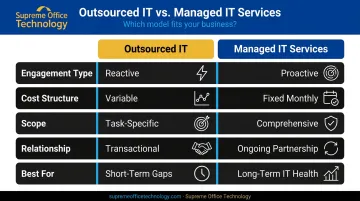
Outsourced IT vs. Managed IT Services: At a Glance
| Dimension | Outsourced IT | Managed IT Services |
|---|---|---|
| Engagement Type | Reactive (problem-driven) | Proactive (ongoing monitoring) |
| Cost Structure | Variable — per incident, hourly, or per project | Fixed monthly fee (per user or per device) |
| Scope | Task-specific, narrow | Comprehensive — full IT environment |
| Relationship | Transactional | Ongoing partnership with accountability |
| Best For | Short-term gaps, one-off projects | Long-term IT health, growth-stage businesses |
These models can also work together. Some businesses use a hybrid approach — for example, a company with partial in-house IT staff that relies on a managed provider for monitoring and security while engaging outside specialists for one-time projects.
What Is Outsourced IT Support?
Outsourced IT support is a model where a business hires an external provider to handle specific, defined IT tasks on a break/fix or pay-per-use basis rather than an ongoing contract. You pay for what you need, when you need it, and the engagement ends when the task is complete.
Common Services Covered
Outsourced IT typically covers:
- Troubleshooting hardware or software failures
- Device setup and configuration
- Basic helpdesk calls for individual users
- One-off network setup or system migrations
- Standalone cybersecurity projects
The defining characteristic is that these are responses to specific, identified problems, not ongoing management. That reactive structure shapes both its strengths and its limitations.
Benefits of Outsourced IT
- No long-term contracts — you commit only to the task at hand
- Flexibility to scale up resources for short-term projects without permanent overhead
- Access to niche expertise for a defined engagement, without hiring full-time staff
- Lower overall spend for businesses with infrequent IT needs
Clutch reports that 37% of small businesses currently outsource IT services, reflecting how common task-based IT support remains for smaller organizations.
Drawbacks of Outsourced IT
- No proactive monitoring: problems surface only after damage occurs
- Inconsistent quality, since different technicians handle each engagement with no shared context
- No institutional knowledge: each provider starts from scratch with your systems
- Unpredictable costs — a single crisis can spike your IT spend significantly
When Outsourced IT Makes Sense
Outsourced IT is a logical fit when:
- You're a startup with minimal IT infrastructure and very occasional needs
- You're launching a one-time technology project (new network setup, software migration)
- You already have partial in-house IT staff and only need occasional supplemental help
What Are Managed IT Services?
Managed IT services is a proactive, subscription-based model where a Managed Services Provider (MSP) takes ongoing responsibility for monitoring, maintaining, and optimizing a business's entire IT environment. The arrangement is governed by a Service Level Agreement (SLA) — and rather than waiting for a call, the provider is continuously watching your systems.
Services Typically Included
Where outsourced IT handles narrow tasks, managed IT covers the full environment:
- 24/7 network and system monitoring
- Proactive maintenance, patching, and updates
- Cybersecurity strategy and incident response
- Cloud backup and disaster recovery
- Helpdesk support for all users
- Long-term IT planning and technology roadmaps
- Compliance guidance (relevant for healthcare, legal, and financial businesses)
Benefits of Managed IT Services
- Flat monthly pricing eliminates surprise invoices after a system failure
- Issues are caught and resolved before they disrupt your workday
- One monthly fee covers a full roster of specialists, not just one generalist
- Continuous monitoring closes security gaps that point-in-time fixes leave open
- Support scales as your headcount and infrastructure grow
The demand for this model reflects its effectiveness: [Datto's State of the MSP Industry report](https://www.datto.com/wp-content/uploads/dlm_uploads/DAT-2024-State-of-the-MSP Report-1.pdf) found that 61% of SMBs choose MSPs because they need more technical expertise than they have internally, with 44% citing increasing cybersecurity concerns as a driver.
Drawbacks and Considerations
Managed IT isn't without trade-offs. It requires a longer-term commitment, and businesses need to accept that day-to-day IT decisions will involve the provider. Vetting is critical — the SLA you sign determines what guarantees actually apply, so review scope and response-time commitments carefully before signing.
Supreme Office Technology's Managed IT Services
For Connecticut businesses seeking this kind of proactive IT support, Supreme Office Technology — a locally owned provider with over 40 years of experience serving businesses across New Haven, Waterbury, and Middletown — offers managed IT services tailored to organizations of all sizes. Their team has hands-on experience across industries including healthcare, legal, and manufacturing — environments where downtime and compliance gaps carry real consequences. You can reach their team at (203) 239-6511 or request a free assessment at supremeofficetechnology.com.
Key Differences Between Outsourced IT and Managed IT Services
Reactive vs. Proactive Approach
The most fundamental difference is timing. Outsourced IT waits for you to report a problem before anyone acts. Managed IT continuously monitors your systems and resolves potential issues before they cause disruption.
Consider the home plumbing comparison: outsourced IT is calling a plumber after a pipe bursts. Managed IT is the scheduled inspection that catches corroding pipes before the flood.
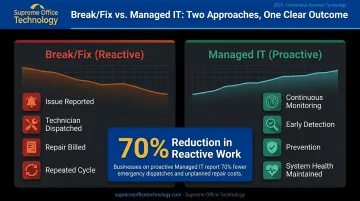
A Kaseya case study tracking a provider that moved from break/fix to proactive management reported a 70% reduction in reactive work after the transition. That's time and cost that disappears when prevention replaces repair.
Cost Structure and Predictability
| Billing Model | Outsourced IT | Managed IT |
|---|---|---|
| Structure | Per incident, hourly, or per project | Flat monthly fee (per user or per device) |
| Predictability | Low — spikes during crises | High — consistent regardless of incident volume |
| Emergency premium | Common | Typically included in SLA |
Managed IT pricing typically runs on a per-user or per-device basis. Survey data from Kaseya's Global MSP Benchmark Survey suggests many providers charge $50–$100 per device or user per month, though actual rates vary significantly by service scope, location, and provider.
The key advantage isn't just the structure — it's the elimination of emergency cost spikes. When your systems go down on a Friday afternoon under a break/fix arrangement, you're paying premium rates. Under managed IT, that scenario is already covered.
Scope of Coverage and Strategic Value
Cost predictability is only part of the picture. Outsourced IT handles what you ask it to handle — nothing more. There's no accountability for overall system health, no visibility into what you didn't think to ask about, and no strategic guidance on where your IT infrastructure is headed.
Managed IT covers the full environment and typically includes:
- Ongoing compliance and regulatory guidance
- Technology roadmap planning
- Security posture reviews
- Infrastructure recommendations ahead of growth
This is the difference between a vendor and a partner. An MSP functions as an outsourced IT department, not just a fix-it crew.
Relationship and Accountability
Outsourced IT is transactional by design — the provider completes a task and disengages. The next time you call, you may get a different technician with no knowledge of your environment.
Managed IT is a continuous relationship. The provider learns your systems deeply over time, understands your workflows, and is directly incentivized to keep everything running — because their SLA commitments are tied to performance. As MSPAlliance notes, MSPs make money when client IT assets run normally. Break/fix providers profit from problems. For businesses in Connecticut and beyond, that means your MSP's financial interest and your operational interest actually point in the same direction.
Which IT Support Model Is Right for Your Business?
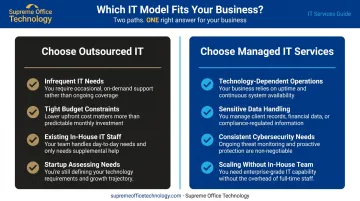
Choose Outsourced IT If:
- Your business has infrequent, one-off IT needs
- You have a tight budget and minimal IT complexity
- You already have in-house IT staff who only need occasional supplemental support for specific projects
- You're a startup still assessing what your IT needs will look like long-term
Choose Managed IT Services If:
- Your business relies heavily on technology for daily operations
- You handle sensitive data — legal, healthcare, or financial records — where downtime or breaches carry serious consequences
- You need consistent cybersecurity protection, not point-in-time fixes
- You want to scale without the cost and complexity of building an in-house IT team
JumpCloud's 2025 report found that 46% of SMEs have experienced a cybersecurity attack — and 55% of IT admins report feeling more concerned about security than six months prior. For businesses in that position, waiting for something to go wrong isn't an option.
If you're a Connecticut business unsure which model fits, Supreme Office Technology offers a no-obligation assessment to help you figure that out. Serving businesses across the state since 1982, their team can evaluate your current environment and recommend an approach that matches your size, budget, and goals. Reach them at (203) 239-6511 or visit supremeofficetechnology.com.
Frequently Asked Questions
What are outsourced managed IT services?
"Outsourced managed IT services" refers to managed IT delivered by an external MSP — meaning the provider takes on ongoing, comprehensive management of your IT environment. Managed IT itself is a form of outsourcing, but one focused on continuous monitoring and maintenance rather than task-based support.
What is the main difference between outsourced IT and managed IT services?
The core difference is reactive versus proactive. Outsourced IT responds to problems after they're reported; managed IT continuously monitors systems and resolves potential issues before they cause disruption. Managed IT also uses predictable monthly pricing rather than variable per-incident billing.
What IT services are most commonly outsourced?
Common task-based outsourced IT services include helpdesk support, hardware setup, software troubleshooting, basic cybersecurity tasks, and project-based work such as network setup or system migrations.
How much do managed IT services cost?
Managed IT is typically priced as a flat monthly fee per user or per device. Most providers charge $50–$100 per user or device per month, though the final figure depends on scope and service inclusions.
Can a small business benefit from managed IT services?
Managed IT is particularly well-suited for small businesses that can't justify full-time IT staff. It provides enterprise-level monitoring, security, and support at a predictable monthly cost that scales with the business — without the overhead of salaries and benefits.
Is managed IT the same as having an in-house IT team?
Not exactly, but the function is similar. Managed IT delivers the same ongoing support, monitoring, and strategic guidance an internal department would provide. The difference: lower cost, access to a broader range of specialists, and no full-time headcount commitment.